
Introduction
What happens when an AI system needs to answer questions? It needs context, tools and it also needs to decide what to do next. Traditional systems retrieve information every time. They call tools every time. They use the same sequential process for every query the user gives. Agentic RAG changes this. The system decides when to retrieve context. It chooses which tools to use and it adapts itself to each question.
This guide explains how to build such systems using Adaline. Adaline provides the infrastructure for deploying prompts, managing tools, and tracking performance. The following sections walk through each step. They explain how the pieces fit together and shows how to build something that works.
What is Agentic RAG?
Before moving to defining agentic RAG, let's first answer "What makes a system agentic?" Essentially, it is a system that makes decisions. It chooses its own path. Consider a simple question: "What is the weather today?" This question does not need context from documents. It needs current weather data. Now consider: "What are the best practices for running in hot weather?" This question needs both context and current data. It needs training documents. It needs weather information. Agentic RAG handles both cases. It routes simple questions directly to the language model. It routes complex questions through retrieval and tools, and then to the LLM.
The Agentic Approach
One important thing to note is that Agentic RAG adds intelligence. The system examines each query and decides if retrieval is needed. It also decides if tools are needed. Essentially, it builds a custom path for each question. The workflow looks like this:
Simple queries skip retrieval. They go straight to the language model. Complex queries get complete treatment. Meaning, they retrieve context, call them tools, and synthesize everything. As a result, costs drop, and latency improves as well. Users get faster answers. The system uses resources efficiently.
Why Should Product Leaders Care about this Architecture?
Agentic RAG solves real problems. It saves money and improves the user experience.
The Cost Problem
Traditional RAG systems retrieve context for every query. This costs money. Embedding generation costs money and Vector search as well. Language model calls with a large context cost money.
Most queries are simple. They do not need document retrieval. They do not need a complex context, and yet traditional systems retrieve anyway.
Agentic RAG changes this. Simple queries skip retrieval. They use the language model directly. Costs drop immediately. Consider one thousand queries; traditional RAG costs eighteen cents per query. Agentic RAG costs fourteen cents per query. That's a twenty-two percent reduction.
The Speed Problem
Retrieval takes time, and so does Embedding generation. Not to forget that vector search takes time as well. Simple queries do not need these steps. Agentic RAG routes simple queries directly. They respond two to three times faster. And users notice the difference.
The Accuracy Problem
Sometimes retrieval adds noise. Irrelevant documents confuse the model; they introduce context pollution. The response quality suffers. Agentic RAG retrieves only when needed. It retrieves only relevant documents. Response quality improves.
The Scalability Problem
Traditional systems are hard to extend. Adding new capabilities requires changing core logic. Testing becomes difficult. Agentic RAG, on the other hand, uses tools. Tools are independent modules. New tools can be added without changing the core. This way, the system grows naturally.
Building Your First System
The orchestrator is the core component. It coordinates query routing, retrieval, agent creation, and tool execution.
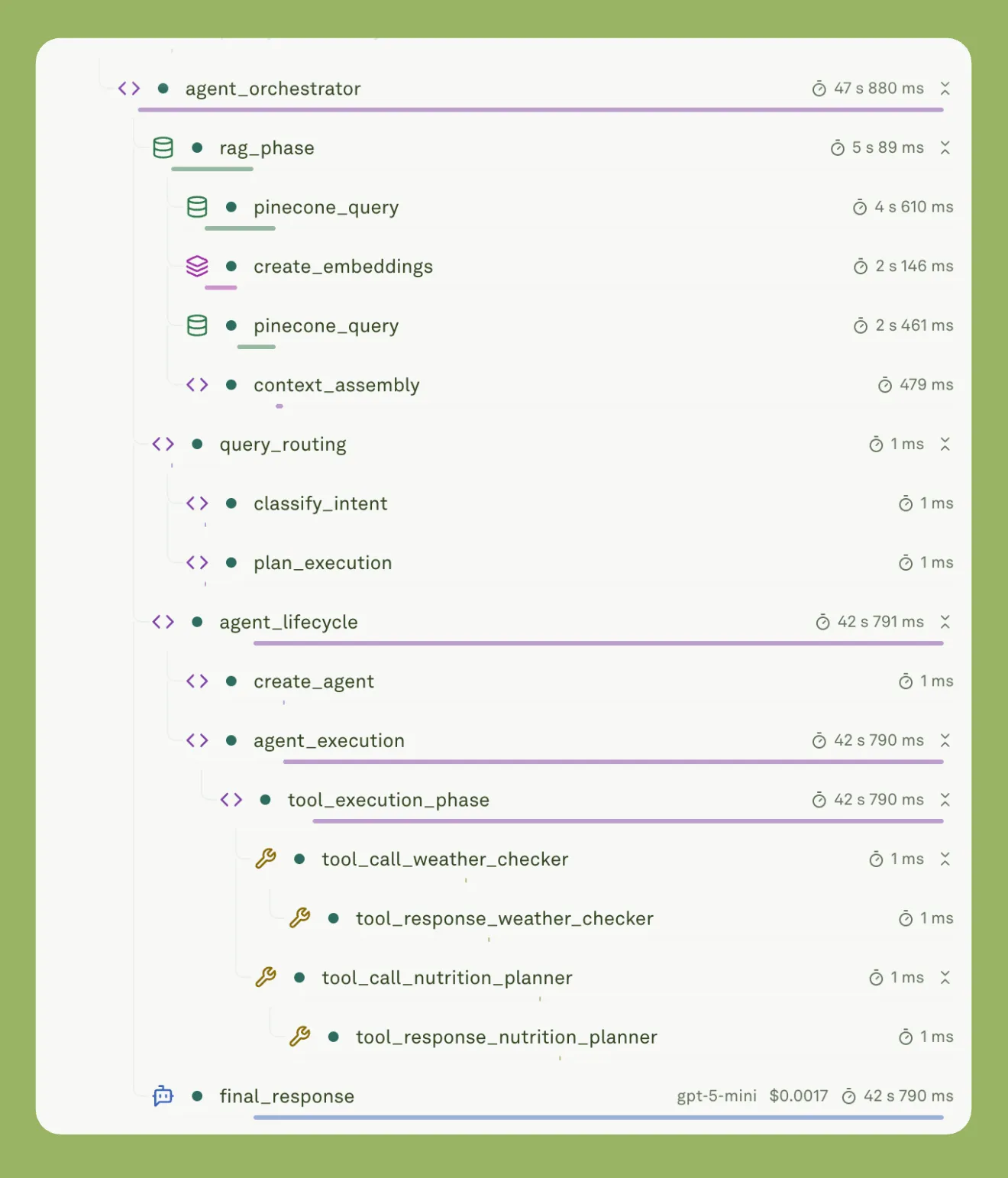
The image shows how the orchestrator decides which component to execute based on the user query.
Here is how it works.
The Orchestrator Function
The main function receives a user query and decides the execution path:
It initializes observability first. Every operation gets tracked:
Query Routing
The system, then, examines the query to decide if retrieval is needed:
If the query contains "RAG" or "context", retrieval is enabled.
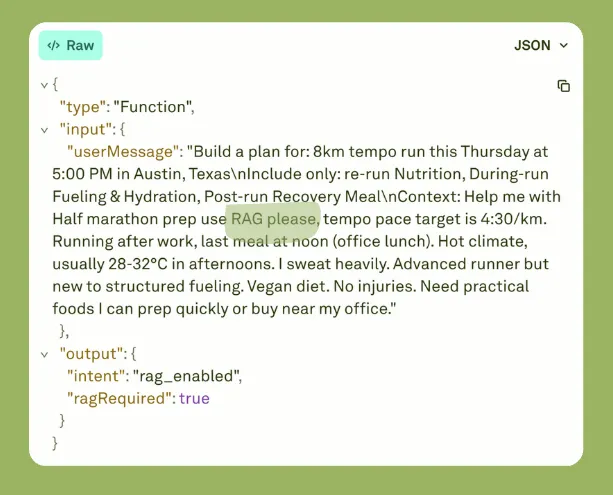
If the user message contains the phrase "RAG," then the RAG is enabled. This is known as intent classification.
Otherwise, the system skips retrieval and goes directly to the agent.
Conditional Retrieval
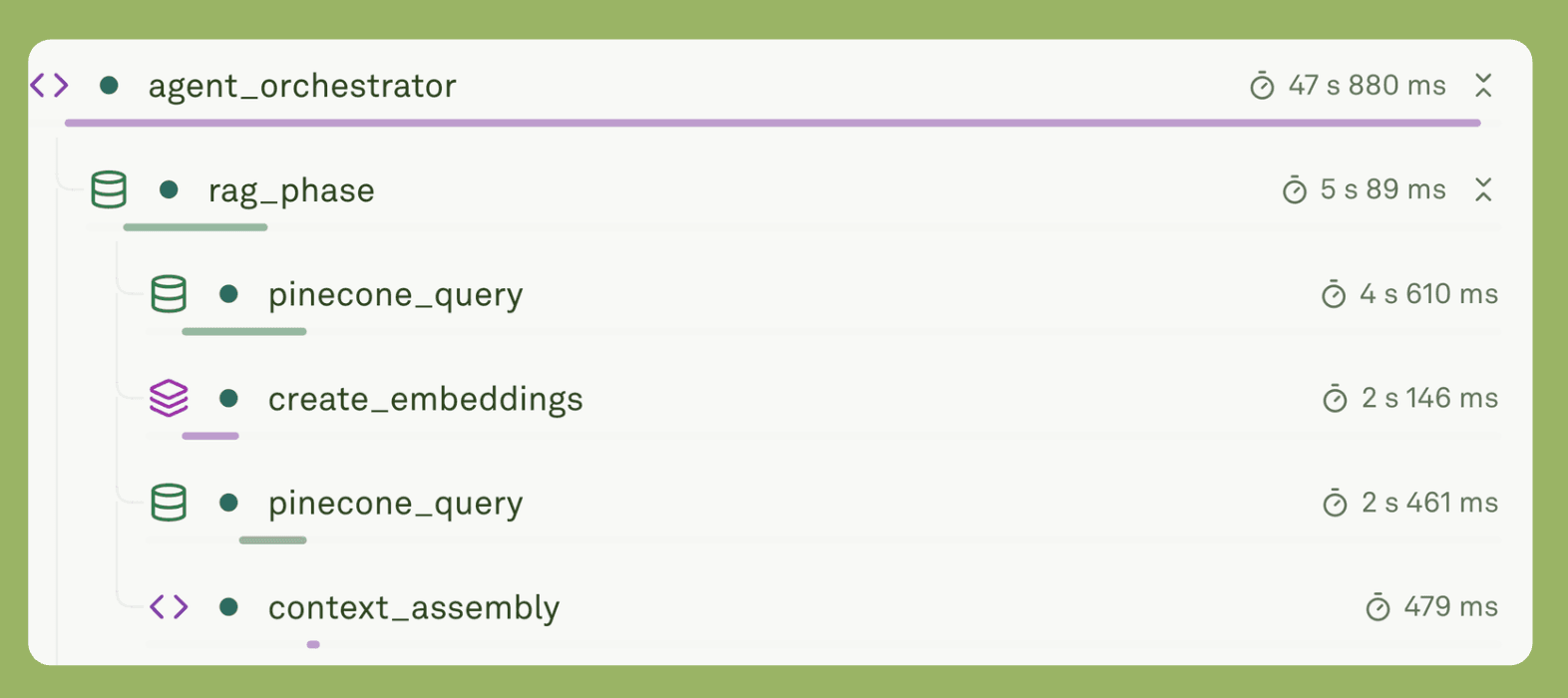
A simple workflow for retrieving information from a vector database.
When retrieval is needed, the system generates an embedding and queries Pinecone:
The retrieveTopK Function creates an embedding using Adaine Gateway:
Then it queries Pinecone:
The system retrieves the top five matches and assembles context from the original files:
Tools are converted from Adaline's format to the agent's format:
Tool Execution
When the agent calls a tool, the execute function runs the following script:
Tool handlers are simple functions:
Adaline Integration
The system fetches the deployed prompt hosted in Adaline.

Variables are injected into the fetched prompt template.
Observability
Every operation creates a span.
The trace is submitted to Adaline at the end:
Understanding the Components
Each component has a specific role. Here is how they work together.
Query Routing
Routing examines the query and decides the execution path. The implementation uses pattern matching:
The system creates an execution plan:
This plan determines which phases run. Simple queries skip the RAG phase entirely.
Conditional Retrieval
Retrieval generates embeddings through Adaline Gateway:
The projectToDim function adjusts embedding dimensions to match the Pinecone index. Then it queries:
Metadata parsing extracts file and chunk information:
Context assembly combines retrieved chunks:
Agent Creation
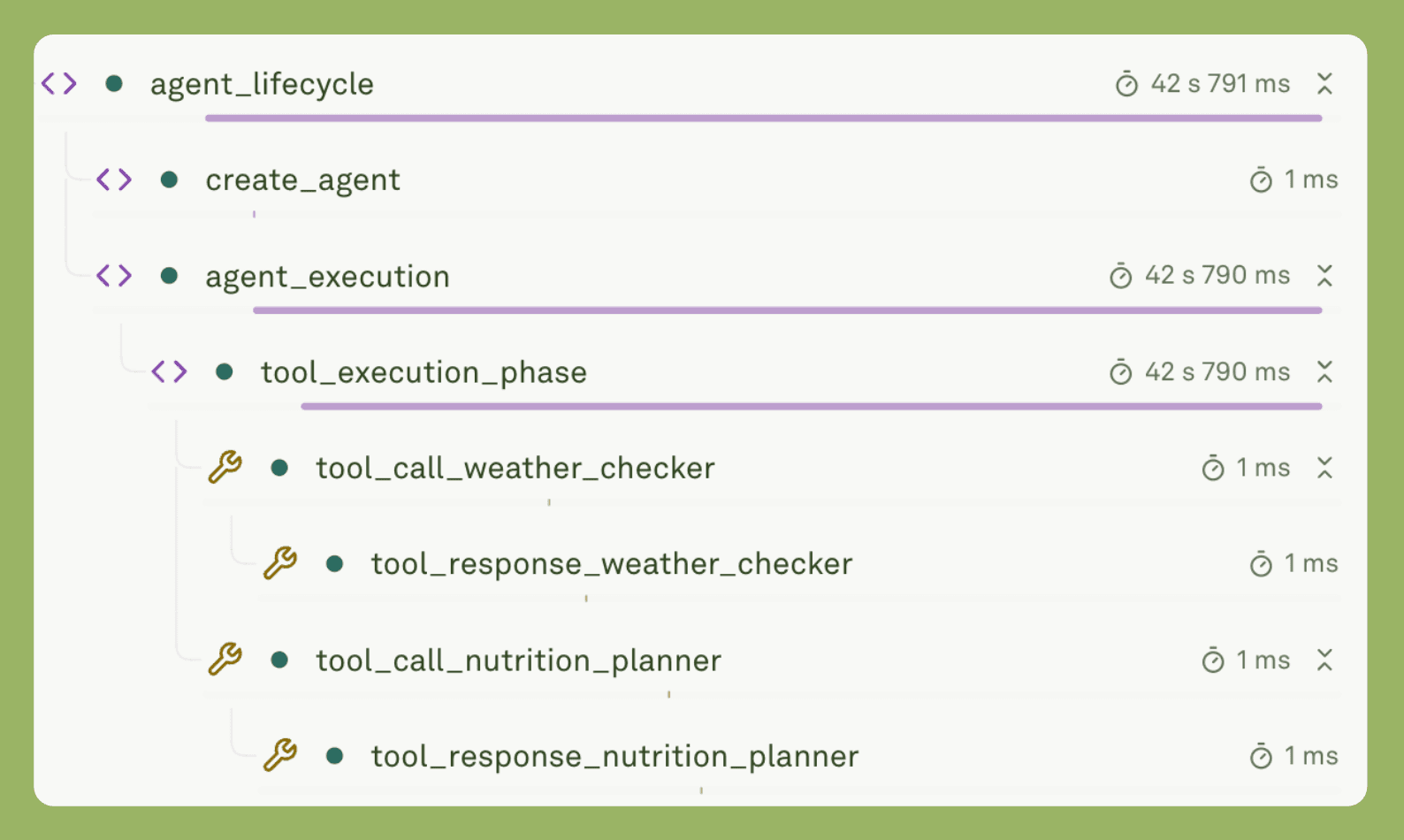
The agent is created to incorporate the necessary tools further.
The orchestrator creates agents with tools.
Tool conversion handles schema differences:
The agent runs with the user message:
The orchestrator tracks each tool call:
Observability
Traces capture the complete flow:
Spans are added for each operation:
Making It Work in Production
How do you take an Agentic RAG system from prototype to production? Focus on reliability. Focus on performance. Focus on monitoring.
Reliability
Production systems must handle errors gracefully. Tool calls can fail. Retrieval can fail. Language model calls can fail. Implement error handling in tool execution:
If retrieval fails, continue without context:
Performance
Production systems must be fast. Optimize retrieval with caching:
Execute tools in parallel when independent:
Track latency in spans:
Monitoring
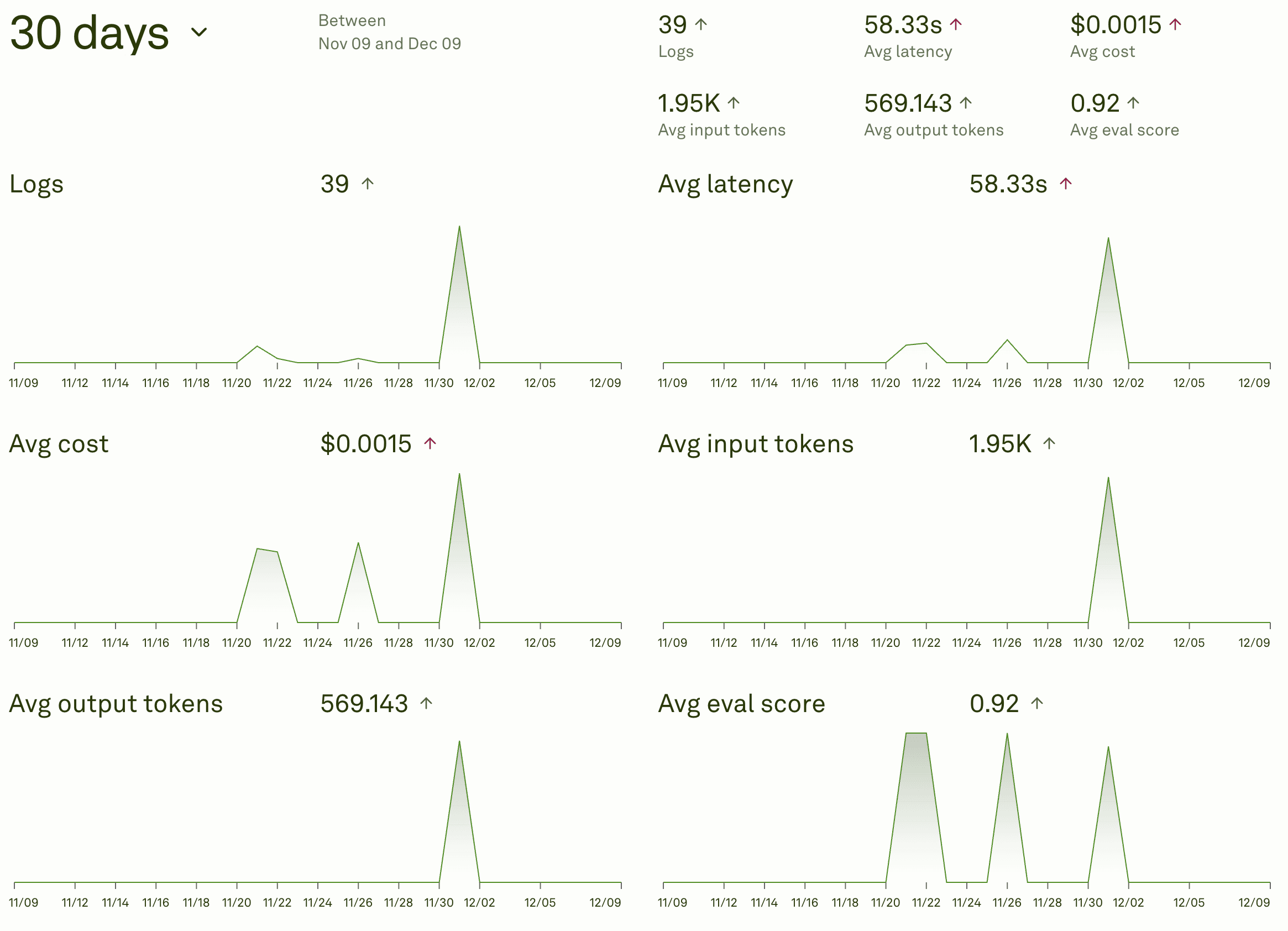
Adaline's dashboard allows you to monitor important metrics in real-time.
Production systems need monitoring. Meaning, you should have a proper dashboard to track key metrics. Track and monitor trends, identify peak times, and track costs.
Gradual Rollout
Do not launch to everyone at once. Start with internal testing. Move to beta users. Gradually increase traffic. Week one and two: Internal testing with ten percent of queries. Catch obvious bugs. Verify basic functionality.
Week three and four: Beta users with twenty-five percent of queries. Gather feedback. Monitor performance.
Week five and six: Gradual increase to one hundred percent. Watch metrics closely and be ready to roll back. This approach reduces risk. It catches problems early and allows adjustments before full launch.
Common Mistakes
What mistakes do teams make when building Agentic RAG systems? Learn from others. Avoid these pitfalls.
Over-Engineering Routing
Some teams build complex routing systems. They use machine learning models. They add multiple classification layers. Start simple instead. Use keyword detection. It works for most cases and only upgrade if needed. When to upgrade? Routing accuracy drops below eighty-five percent. False positive rates are high. Query patterns become complex.
Ignoring Costs
Some teams do not monitor costs. They build the system. They deploy it. Costs spiral out of control. Set up cost monitoring from day one. Essentially, tracking costs per query. Also, set budget alerts and review costs weekly. Implement cost optimizations, such as caching frequently queried queries. Use smaller models for routing. Optimize retrieval parameters.
Poor Error Handling
Some systems fail when one component errors. A tool failure stops everything. A retrieval failure stops everything. Implement graceful degradation. If retrieval fails, continue without context. If a tool fails, continue without that tool. Always return something useful. Implement retry logic. Transient failures should retry. Use exponential backoff, like limit attempts. Implement user-friendly error messages. Explain what went wrong. Suggest alternatives. Do not show technical details.
Neglecting User Experience
Some teams focus on technical implementation. They ignore user experience. Users get confused. Show loading states. Indicate when tools are running. Show progress. Keep users informed. Provide source attribution. Show where the information came from. Build trust. Enable verification. Explain tool usage. Tell users what tools are being used. Explain why. Build understanding. Collect user feedback. Ask for ratings. Monitor comments. Act on suggestions.
Insufficient Testing
Some teams deploy without thorough testing. They test happy paths only. Production reveals problems. Test all components. Test routing logic. Test retrieval. Test tools. Test error handling. Test integration. Test the full flow. Test edge cases. Test error scenarios. Test under load. Simulate production traffic. Measure performance. Identify bottlenecks.
Tool Overload
Some teams add too many tools. They think more tools mean more capabilities. The agent gets confused. Start with two or three essential tools. Add tools incrementally. Monitor usage. Remove unused tools. Each tool should have a clear purpose. Each tool should be well tested. Each tool should add value.
Conclusion
Agentic RAG represents the next step in AI systems. It combines retrieval with intelligence and combines tools with autonomy. It adapts to each query. Building such systems requires understanding. Understanding of routing, retrieval, agents, and of tools.
Adaline provides the infrastructure. It handles prompt deployment. It manages tool integration. It tracks performance. It simplifies development. The path forward is clear. Start simple. Add complexity gradually. Monitor everything. Iterate based on results. The benefits are real. Costs drop. Latency improves. Quality increases. Users are happier.