
Today, AI models, like Qwen2.5-70B, are big enough to consume more than 150GB of memory (RAM). So, typically these models will not fit in your laptops. And buying GPUs that can allocate these models will be quite expensive.
The paper by Hu et al. (2021) shows you can freeze most of a large model and instead train much smaller matrices to adapt it. They called it Low‑Rank Adaptation (LoRA). When you first explore LoRA, it seems simple, but it is very interesting.
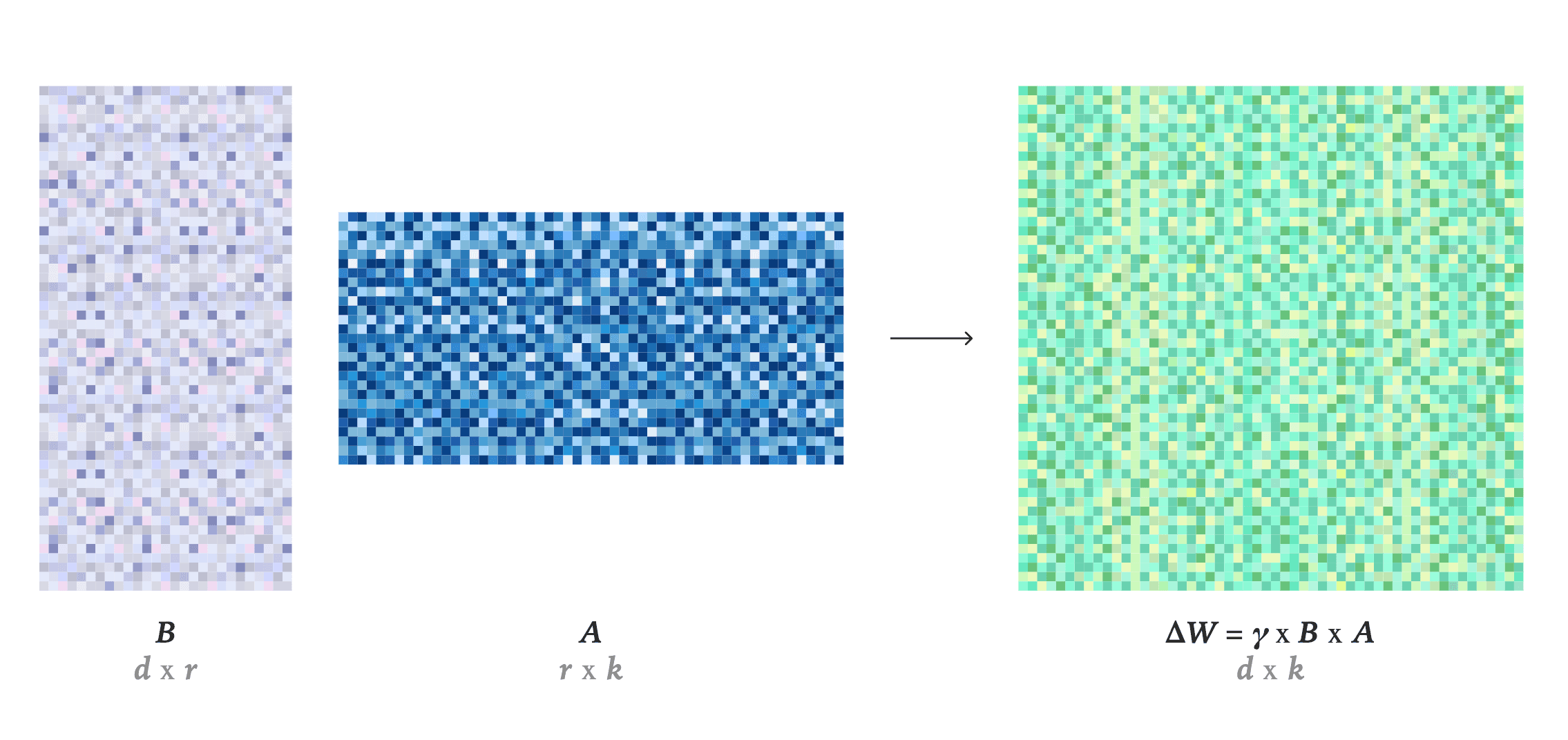
Source: LoRA Without Regret
A recent article from Thinking Machines explains how LoRA replaces weight matrices with low-rank components to reduce memory and complexity.
In this blog, you’re going to see how that technique changes when you apply different loss functions and why that matters deeply for efficient fine-tuning. You’ll follow the journey of applying LoRA, measuring it. Also, refining it as a builder who cares about how models learn and behave.
For better reading experience, please refer to this Colab Notebook. This will allow you to run the experiment side-by-side.
LoRA Made Fine-Tuning Cheap, But Not Always Efficient
LoRA changed the way you think about fine-tuning. So, instead of retraining every layer in a giant model, you slip in small, low-rank adapters that do most of the learning.
Low-rank adapters are new matrices (A, B) that are introduced or augmented to the model. The model weights are frozen, which preserves the pretrained knowledge.
- The base weights (W), preserving the pretrained knowledge by freezing them.
- Only the adapters (A, B) learn new information.
These adapters sit quietly inside the model’s architecture. Their job is to adjust the flow of information without disturbing what was already known. In other words, they don’t overwrite any of the previous information. Without LoRA, finetuning will erase a previous knowledge, this is known as catasphropic forgetting. LoRA reduces catasphropic forgetting by freezing the weights. Keep in mind it doesn’t fully eliminates it.
With the help of LoRA you can take a 7-billion-parameter model like Mistral-7B and teach it new behavior by updating just a fraction of its weights. That’s the beauty of LoRA. It saves memory, cuts down training time, and works well with limited hardware.
Here is how to augment or slip in LoRA.
We will explore this code in the next section.
To go further, you combine it with quantization, often 4-bit precision using libraries like BitsAndBytes.
In quantization instead of storing weights in 32-bit precision, you compress them to 8-bit or 4-bit. One way to think is that the model still thinks the same way, but it remembers less precisely.
BitsAndBytesConfig in Transformers helps you control this process. It lets you specify:
- how many bits to use (
load_in_4bit=True), - the quantization type (
nf4), - and the computation precision (
bfloat16).
Together, these settings lets you fit massive models on limited GPUs while keeping accuracy intact.
That means fewer bits per weight, smaller tensors, and lighter GPU loads. Together, LoRA and quantization make fine-tuning cheap enough for almost anyone to try. Quantization allows you train large pretrained model on budget GPUs such as A100 on Google Colab.
Now, once you have the LLM [in this case “Mistral-7B-v0.1 ”] downloaded and quantization and LoRA config ready, you bring them all together.
model = prepare_model_for_kbit_training(model): This base class prepares a quantized model for training with LoRA.
What it does:
- Enables gradient computation for specific layers that needs to be trained.
- Converts certain layers to appropriate data type (dtypes) (like
float32orbfloat16) for stability. - Freezes the quantized base weights (which are in 4-bit or 8-bit format)
- Sets up the model architecture so adapters can be added on top of quantized layers
get_peft_model(model, lora_cfg): This wraps your model with LoRA adapters based on your configuration.
model.print_trainable_parameters()
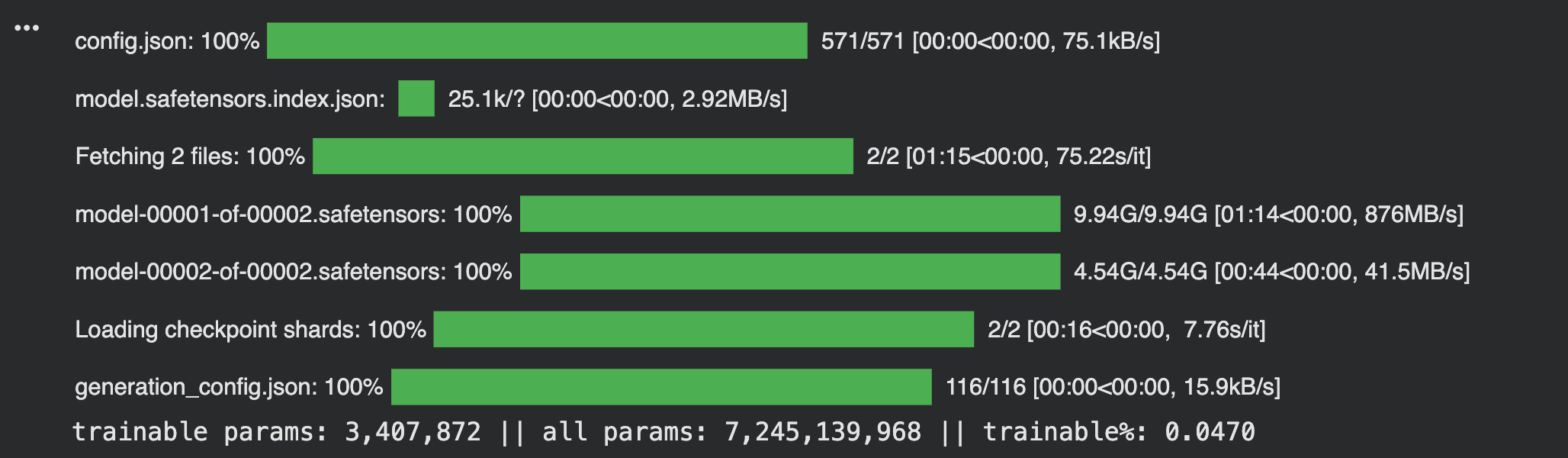
Loading a LoRA Model
The progress bars show different components downloading: configuration files, safetensors (the model weights), and checkpoint shards.
Notice the final line. It reveals the efficiency of LoRA.
- Trainable params: 3.4 million
- All params: 7.2 billion
- Trainable percentage: 0.047%
You're training less than one-twentieth of one percent. The rest stays frozen. This is why you can fine-tune massive models on modest hardware. The base knowledge remains untouched. Only tiny adapters learn new behavior. In this case the adapters count for 3.4 million.
But cheap is not the same as efficient.
Efficiency isn’t just about how little memory you use or how fast your GPU runs. It’s about how well the model learns within those limits. Many teams chase lower compute bills and forget to look at the signal itself. These include the gradient quality, the learning stability, the way loss evolves.
When you fine-tune, what you’re really buying is not time or hardware cycles. You’re buying learning.
That’s why this exploration matters.
- It asks: What happens when you keep LoRA constant but change the loss function?
- It looks for whether cheaper training can also be smarter.
Because in the end, fine-tuning isn’t just about saving cost. It’s about teaching a model efficiently with clarity, direction, and balance.
Why the Loss Function Still Rules the Game
When you train or fine-tune a model, the loss function tells you how far or close the model is from the ground truth. Simply put, what is the difference between model generated answer with the real answer. It tells the model how to adjust itself inorder to get as close to the ground truth. Or, to reduce the difference between the two outputs. Every update flows from it. Whether you are using LoRA or not, that is the primarily principle.
Most people begin with Cross-Entropy.
It’s the default; it is clean, well-understood, and reliable. It measures how far the predicted distribution is from the correct one. But it can be brittle. For instruction-following models, where multiple answers might be acceptable, Cross-Entropy punishes every deviation harshly. On imbalanced datasets, it amplifies the bias of frequent patterns while ignoring the rare ones.
That’s where Label Smoothing helps.
Instead of treating one token as completely right and all others as wrong, it softens the edges. You spread a small amount of probability mass across alternatives, which makes the model less certain and more stable. It reduces overconfidence and helps the model generalize better when faced with noisy or ambiguous data.
Then comes Focal Loss.
As the name suggests it is designed for focus. Initially, it was designed for R-CNN but it does quite well on LLMs as well. It down-weights easy predictions and puts more weight on hard ones. Tokens that the model already predicts well get smaller gradients; difficult tokens get stronger corrections. Over time, this shapes a more balanced learner, one that doesn’t waste effort on what it already knows.
If you were to plot it, you’d see three curves.
- Cross-Entropy: It is steep at first, then flat. It learns fast, then stalls.
- Label Smoothing: Generally, it is smoother and slower. It glides toward stability.
- Focal Loss: You can say that it is jagged but purposeful. Its gradient peaks around the hard tokens.
Each loss function tells a different story about how learning happens. And when paired with LoRA, those stories reveal how efficiency and understanding are never quite the same thing.
Experimental Setup: Mistral-7B + LoRA + OpenR1 Math
The goal is to test how LoRA behaves under different loss functions. To do that, you need a setup that’s controlled, repeatable, and transparent. Every variable matters, from model size to optimizer type.
You can use models like Mistral-7B-v0.1 as the base model.
It’s small enough to run experiments quickly but large enough to show meaningful patterns. You apply LoRA adapters with the following configuration:
- Rank (r) = 4
- Scaling factor (α) = 8
- Dropout = 0.05
Let’s understand the code in detail. Essentially, you're setting the rules for how your adapters will learn.
The rank (r=4) determines adapter size. Smaller means fewer parameters. LoraConfig reads each target layer's dimensions (d, k) and creates adapter matrices. The matrices created fits those dimensions while keeping your specified rank constant.
In the image above you will see that d and k comes from the model while r is something that you define.
Alpha (8) scales the adapter's influence. Think of it as volume control for new learning.
Dropout (0.05) prevents overfitting by randomly silencing 5% of connections during training.
You're targeting four attention layers:
- Query, Key, Value projections
- Output projection
These are where the model decides what to focus on. By adding adapters here, you reshape attention patterns without touching the base weights.
The task type tells the system you're working with text generation. Everything connects. Rank controls capacity. Alpha balances old and new knowledge. Target modules choose where learning happens.
These adapters let you update only small, low-rank matrices while keeping the base model frozen. This reduces memory and compute. Also, stability still depends on your loss and hyperparameters.
For data, you choose the OpenR1 Math dataset, a 220k-sample collection of structured math problems. From it, you take a subset of 5,000 samples to keep runs manageable. Each sequence is tokenized to a block size of 1,024, matching Mistral’s context window.
The optimizer is paged_adamw_8bit. This is a variant designed to handle memory more gracefully on GPUs with limited VRAM. You also enable 4-bit quantization with BitsAndBytes, ensuring consistent performance even under smaller hardware constraints.
To make results fair, you fix the random seed, 3407, across all runs. Evaluation happens at consistent intervals, every 50 steps, keeping comparisons uniform.
Then you write a CustomLossTrainer to plug in different loss functions cleanly.
It computes training losses with the chosen function — Cross-Entropy, Label Smoothing, or Focal Loss — and always evaluates with standard Cross-Entropy for parity.
The code below defines the different loss functions.
You can also include a LossTracker callback, that logs every training step. It records loss values, global steps, and evaluation checkpoints, making the learning curve visible in real time.
It’s a setup built for clarity and the aim if avoid complexity as much as possible. Each run tells you something different. For instance, how loss affects convergence, how LoRA reacts, and how small changes in training design can shift the story of efficiency itself.
Comparing Efficiency Metrics
When you talk about efficiency in fine-tuning, it’s easy to think only in terms of speed. But efficiency is more than that. It’s not just about how fast your model trains it’s also about how well it learns. Meaning, the model should learn within the time and compute you give it.
You can think of efficiency through three simple lenses:
- 1Convergence speed per GPU hour: How quickly the loss flattens?
- 2Stability: How much the loss fluctuates across steps?
- 3Generalization: How well the model performs on unseen data, often measured through perplexity?
Below are the results with with Mistral-7B and LoRA.
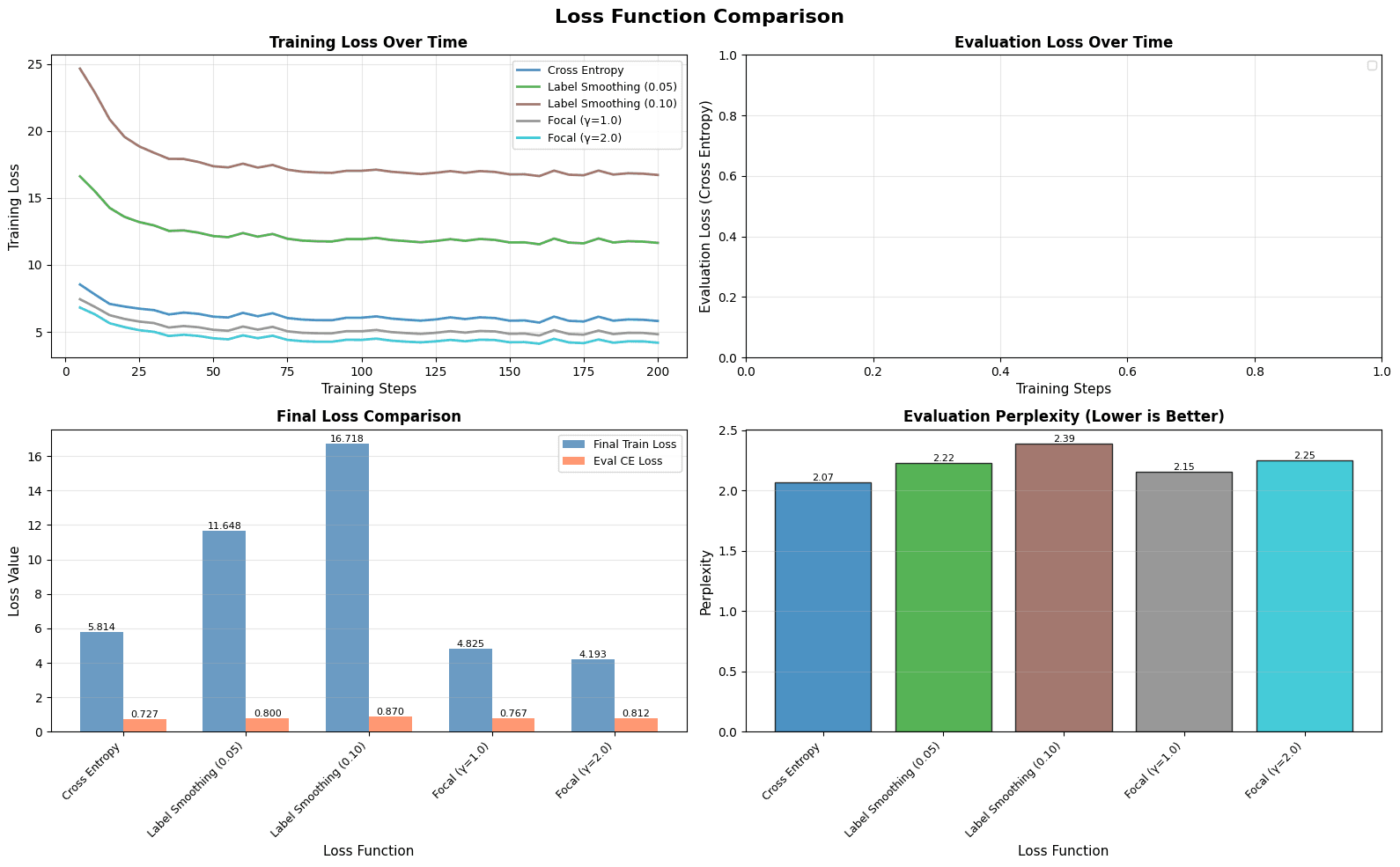
Final result after the experiment.
Cross-Entropy got to lower range quickly but stumbled after a point. It learned the easy tokens first, then began to overfit, showing sharp dips and rises in training loss.
Label Smoothing, in contrast, moved slower but steadier. By softening the targets, it taught the model to be less certain. This reduces overconfidence and helping generalization. The cost was pace; convergence took longer, but the curve was smooth.
Focal Loss brought focus. It accelerated learning on the harder tokens — the ones the model kept getting wrong. But that focus came with sensitivity; a slightly high learning rate made it unstable. Lowering it restored balance and preserved the speed advantage.
Efficiency, then, isn’t about pushing the GPU harder. It’s about shaping learning so that every step counts. Essentially, fewer wasted updates, steadier gradients, and a model that learns with purpose.
Practical Guidelines for LoRA Fine-Tuning
When you begin fine-tuning with LoRA, start simple. Use Cross-Entropy first.
Cross entropy gives you a clean baseline and helps you understand how your model learns. But don’t stop at the final loss number. Watch how it moves, the small ups and downs reveal how stable your training really is.
If you see sharp swings in loss or gradients, add Label Smoothing. A small value, between 0.05 and 0.1, can make a big difference. It softens the edges of the target and lets your model stay calm when the data is noisy or when there are many valid answers.
For reasoning-heavy or long-context tasks, try Focal Loss. It pulls the model’s attention toward the harder parts of the sequence. This is useful when certain predictions dominate and others are ignored.
Keep a close eye on what the loss tells you, not just the metrics.
- Log the loss per token. It shows you where reasoning starts to slip.
- Visualize loss over time. A smooth curve often means steady learning.
Efficiency in fine-tuning isn’t about faster runs. It’s also about understanding what the model struggles with and adjusting the signal it listens to.
Closing
LoRA made fine-tuning affordable.
You’ve seen how small design choices — a gamma value in Focal Loss or a smoothing factor in Label Smoothing — can shift the entire graph of learning. These tweak enables the model to decide how it spend its effort. Moreover, how it balances confidence with curiosity.
Each fine-tuning run teaches you something different. You can cut parameters, use 4-bit weights, and run lighter adapters, but the signal your loss sends still defines the state of the model.
As someone building and sharing these tools, your goal isn’t to chase benchmarks.
- It’s to help others reason about their models as learning systems, not black boxes.
- It’s to make experimentation transparent, so choices like a loss function or hyperparameter become decisions, not defaults.
If you want to explore further, the full notebook and visualizations are available on Colab and Hugging Face.