
If you are evaluating PromptLayer alternatives, you are typically trying to solve one of these problems:
- Prompts are changing faster than code reviews can keep up.
- Experiments are not repeatable, so regressions slip into production.
- Ownership is unclear, and “who approved this prompt change?” has no answer.
- You need environment promotion and rollback, not just version history.
PromptLayer is a strong prompt management platform with a prompt registry and evaluation workflows. It is often a good fit when your primary need is prompt tracking, prompt collaboration, and structured evaluation batches.
Adaline is better suited when your bottleneck is release discipline: governed prompt changes across Dev/Staging/Prod, explicit approvals, and evaluation gates that prevent regressions from shipping.
Quick Summary
Best Overall PromptLayer Alternative For Production Governance: Adaline
- Best for teams that want one workflow: iterate → evaluate → release → monitor.
- Strong fit when you need approvals, environments, rollback, and eval gates.
When PromptLayer Is Still A Great Choice: PromptLayer
- Best for teams that want a prompt registry, evaluation batches, and analytics.
- Strong fit when you do not require strict release promotion and rollback semantics.
Other Alternatives Worth Shortlisting (Depending On Your Stack)
- Vellum
- LangSmith
- Langfuse
Adaline Vs PromptLayer
How We Evaluated This Comparison
The right tool depends on the reliability constraints you operate under. We compared both platforms across six practical requirements:
- 1
Prompt lifecycle control
Can you manage prompt changes as a controlled release with clear ownership? - 2
Repeatable experimentation
Can you run experiments against test cases and rerun them after every change? - 3
Evaluation gating
Can you enforce pass thresholds before a prompt is promoted? - 4
Team governance
Do approvals, environments, and rollback exist as workflow primitives, not tribal knowledge? - 5
Production linkage
Can you tie a prompt version to production behavior and use incidents to improve tests? - 6
Operational fit
Does the tool fit how your team ships: product-led, engineering-led, or platform-led?
What PromptLayer Is Strong At
PromptLayer is commonly chosen for its “workbench” approach to prompt management:
- Prompt Registry: Storing and organizing prompt templates outside code, including versions and tags.
- Evaluation workflows: Creating batch evaluations so prompt changes can be assessed across datasets.
- Collaboration: Shared access and a structured interface that reduces ad-hoc prompt edits.
- Logging and analytics: Reviewing usage patterns and request histories to spot issues.
If your current problem is that prompt work is scattered across notebooks, docs, and code comments, PromptLayer can bring immediate order.
Where Teams Outgrow PromptLayer
Teams typically outgrow PromptLayer when they move from “prompt tracking” to “prompt releases.” The symptoms look like this:
- A prompt update is made, but there is no strict promotion model across environments.
- Approvals exist socially, not structurally.
- Rollback is possible in theory, but not fast enough to be operational during an incident.
- Evaluations exist, but they do not act as gates for deployment decisions.
- Production debugging requires stitching together multiple tools and workflows.
This is not a critique of PromptLayer’s feature set. It is a category shift.
Prompt management helps you iterate.
Prompt governance helps you ship.
Where Adaline Wins
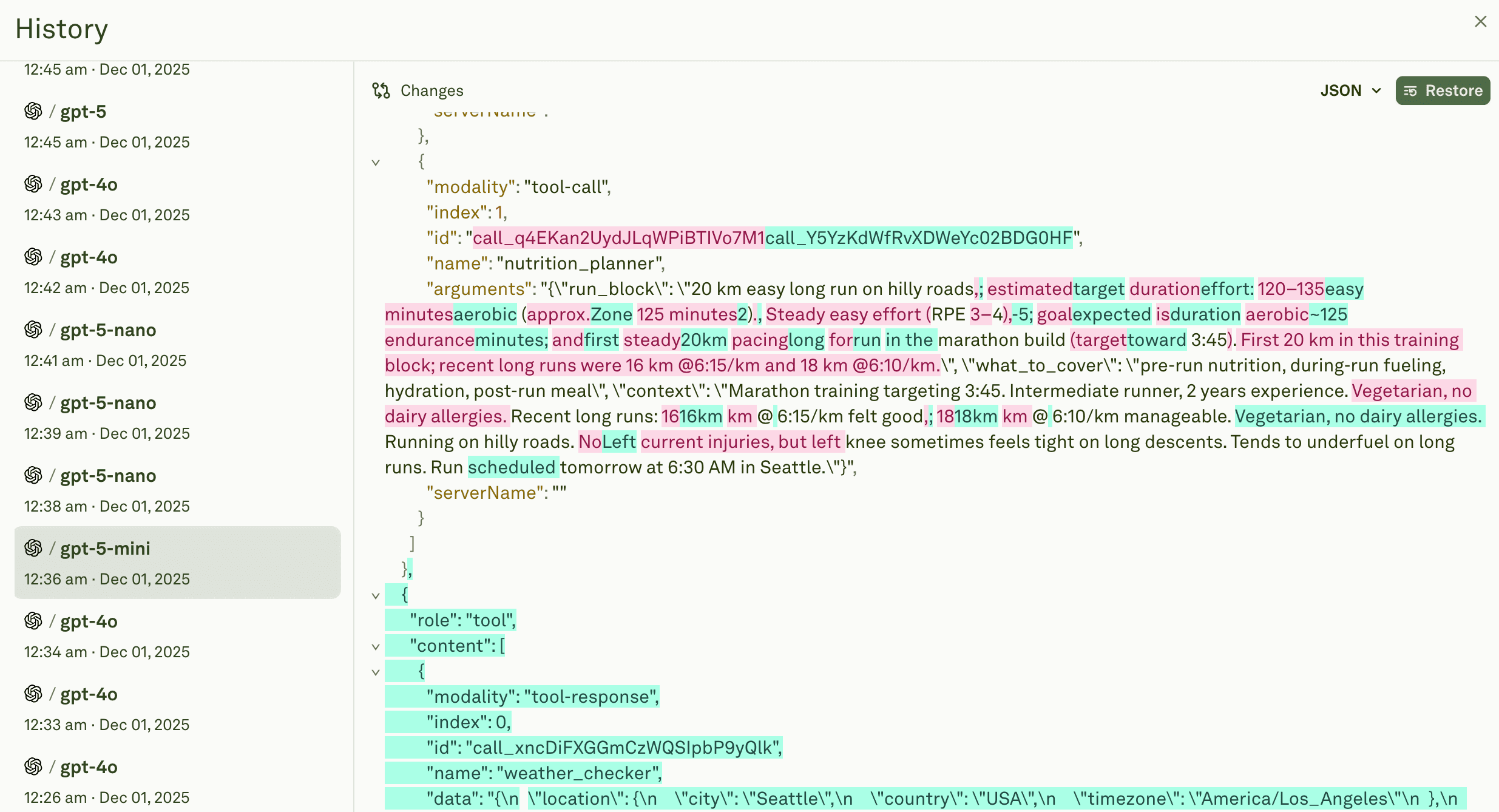
Adaline offers prompt versioning and diff. Users can also restore or rollback previous prompts to production or a certain environment.
Why teams choose Adaline over PromptLayer:
- 1
Release discipline is built in
Adaline is designed around controlled prompt releases. Versioning is not only history; it is a release surface with ownership and rollback. - 2
Environments are first-class
Adaline is built for the reality that teams need Dev/Staging/Prod separation, not a single “latest prompt.” - 3
Evaluation gates reduce regressions
Adaline is strongest when you use evaluations as gates. Instead of “we ran evals,” the workflow becomes “we did not promote because the evals failed.” - 4
Governance is explicit
Approvals, promotion, and rollback are part of the workflow, which reduces policy drift and post-incident ambiguity. - 5
The loop closes in production
Adaline is designed to connect prompt changes to monitoring signals and real-user samples so reliability improves over time.
When is PromptLayer the better choice?
PromptLayer is often a better fit when:
- You want a prompt registry plus evaluation pipelines, and you will enforce governance through team process.
- Your release process is low-risk (internal tooling, low-volume apps, or limited blast radius).
- You want a straightforward prompt management layer without adopting a more structured release workflow.
Decision Framework
Choose Adaline if these statements are true:
- We ship prompt changes frequently and need a review-and-release workflow.
- We require Dev/Staging/Prod separation with controlled promotion.
- We need a fast rollback during incidents.
- We want eval thresholds to function as release gates.
Choose PromptLayer if these statements are true:
- We want a prompt registry plus evaluation workflows and analytics.
- We do not need strict environment promotion and rollback semantics.
- Our governance is lightweight and handled through an internal process.
The Prompt Governance Checklist
Use this checklist to decide whether you need a PromptLayer-style workbench or an Adaline-style release system.
If you answer “yes” to 6 or more, you will usually benefit from Adaline’s governance-first approach.
- Do multiple people edit prompts across engineering and product?
- Do you ship prompt changes weekly (or more often)?
- Would a regression affect revenue, support load, or brand trust?
- Do you need approvals that are auditable, not informal?
- Do you need Dev/Staging/Prod environments?
- Do you need controlled promotion between environments?
- Do you need a rollback that can be executed quickly during an incident?
- Do you need evaluation thresholds that gate promotions?
- Do you need to link a prompt version to production traces or incidents?
- Do you need to convert incidents into new regression tests?
Migration Guide: PromptLayer To Adaline
This migration outline is designed to keep production stable while you switch systems.
Step 1: Inventory your prompts and owners.
- Export or list prompts in your registry.
- Assign an owner for each prompt (a person, not “the team”).
Step 2: Standardize naming and interfaces.
- Define a naming convention.
- Define input variables and expected outputs.
Step 3: Define environments.
- Establish Dev, Staging, Beta, and Production as explicit targets.
- Decide who can promote between them.
Step 4: Rebuild a minimal evaluation set.
- Start with 20–50 representative test cases.
- Include known failure cases and edge cases.
Step 5: Set pass thresholds.
- Decide what “good enough to ship” means.
- Start with conservative thresholds; tighten them over time.
Step 6: Import prompts and versions.
- Bring prompts into Adaline with their history where possible.
- Tag stable versions as Production candidates.
Step 7: Run shadow evaluations.
- Run evaluations in parallel with your current workflow.
- Confirm that the new workflow catches regressions at least as well as the old one.
Step 8: Cut over with a staged rollout.
- Promote to Staging first.
- Monitor.
- Promote to Production with a rollback plan already prepared.
Step 9: Establish an incident loop.
- When a production issue occurs, capture it.
- Convert it into a test case.
- Add it to your regression suite.
FAQs
What is PromptLayer used for?
PromptLayer is commonly used as a prompt management workbench. Teams use it to store and version prompts in a registry, collaborate, run evaluation batches, and review logs and analytics.
What does “PromptLayer alternative” usually mean in practice?
It usually means the team needs more than prompt tracking. The most common driver is governance: approvals, environments, promotion workflows, rollback, and evaluation gates.
Can PromptLayer support evaluations?
Yes. PromptLayer provides evaluation workflows that help teams run batch evaluations over datasets and compare prompt performance.
What is the main difference between Adaline and PromptLayer?
PromptLayer is best understood as a workbench for managing prompts and running evaluation workflows. Adaline is best understood as a release system for prompt changes with governance: approvals, environments, promotion, rollback, and eval gates.
When should a team prioritize governance over experimentation?
As soon as prompt changes have a meaningful production blast radius. If a regression increases support load, affects revenue, or changes safety behavior, governance becomes more important than raw iteration speed.
How do we avoid regressions while switching platforms?
Run a parallel phase. Keep PromptLayer running while you import prompts into Adaline, build a baseline test set, run shadow evaluations, and only then cut over via staged promotion.
Final Take
PromptLayer is a strong choice when you want a prompt registry, collaboration, and evaluation workflows.
If your reliability bottleneck is not “we lack a workbench,” but “we ship prompt changes without release discipline,” Adaline is the better PromptLayer alternative in 2026 because it is built around governed prompt releases: approvals, environments, rollback, and evaluation gates that prevent regressions from shipping.