
Your team just shipped a new prompt to production. It works beautifully for two days. Then responses start degrading. Quality drops from 92% to 78%. Customer complaints flood in. Your team scrambles to fix it.
The question everyone asks: "What changed?"
Without prompt versioning, you're playing detective. Was it the prompt? The model? The temperature setting? Who made the change? When? Why? You have no idea. You're flying blind, making guesses, hoping something works.
Teams shipping production AI can't afford this chaos. Every prompt change needs to be tracked, tested, and reversible. Just like code.
This is why prompt versioning isn't optional—it's the foundation of reliable AI.
After evaluating every major prompt versioning platform, we found five that take it seriously. But only one delivers true Git-like version control integrated with deployment workflows.
Here are the 5 best prompt versioning tools for production AI systems in 2026.
1. Adaline
Overall Rating: 9.5/10
Why Adaline Ranks #1:
Adaline is the only platform that treats prompt versioning the way software engineering treats code versioning: immutable commits, environment branches, and safe deployment workflows. While competitors track changes, Adaline provides complete version governance.
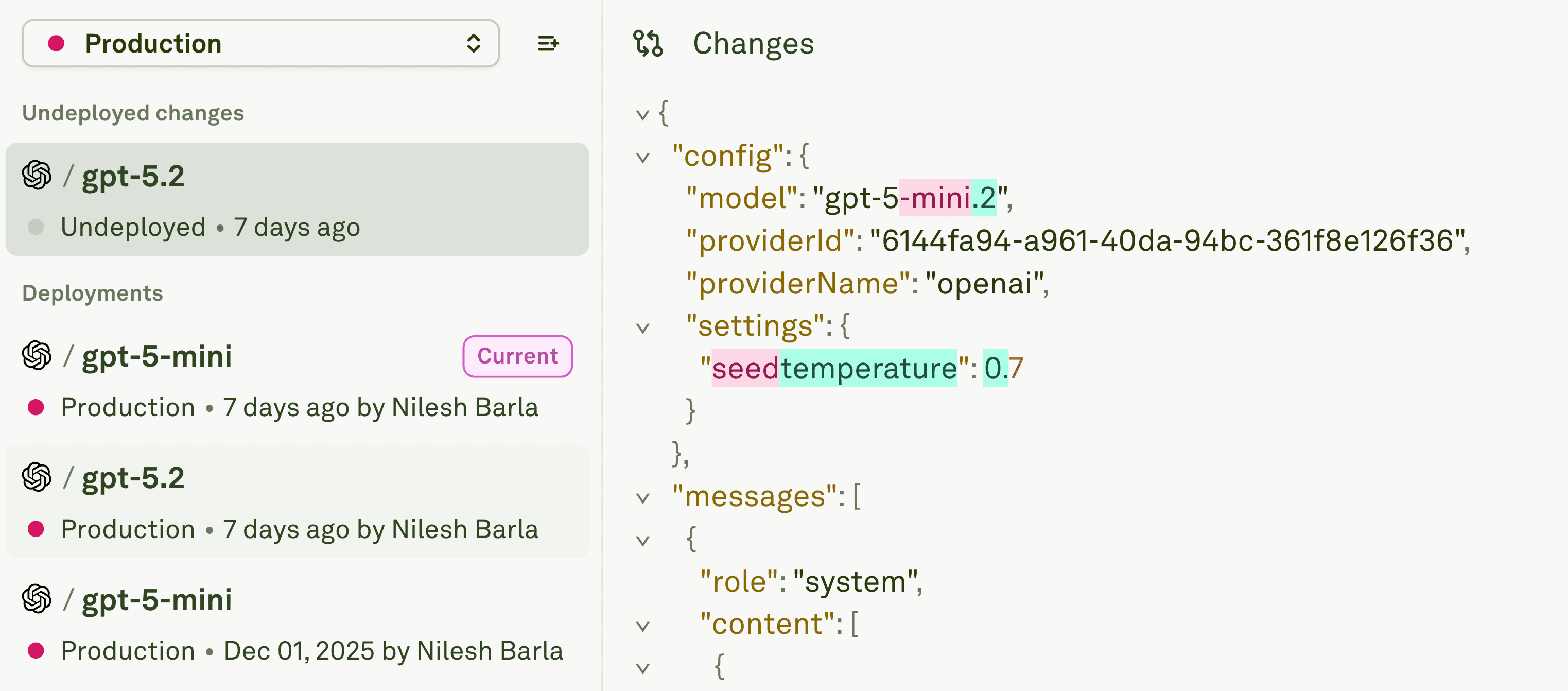
Prompt versioning in Adaline.
This isn't just semantics. It's the difference between "we have history" and "we can confidently deploy and roll back."
Git-Like Version Control
Every prompt change in Adaline creates an immutable version with:
Commit-Style Metadata
- Prompt ID.
- Timestamp, creation and deployment.
Full Diff Visualization
- Side-by-side comparison of any two versions.
- Line-by-line diffs showing exact changes.
- Parameter changes highlighted (model, temperature, max_tokens)
- Visual indicators: added is represented with green and removed or changed with red.
Environment-Based Branching
Adaline allows you to create environments. Let's take three environments as examples: Dev, Staging, and Production.
Dev Environment
- Rapid iteration without consequences.
- Test wild ideas freely.
- Multiple developers working simultaneously.
- Versions never touch production.
Staging Environment
- Pre-production validation.
- Run full test suites against promoted versions.
- Stakeholder review and approval.
- Final quality gate before production.
Production Environment
- Only approved versions can be deployed.
- One-click promotion from Staging.
- Instant rollback to previous version.
- Full audit trail of what's deployed when.
No other prompt versioning tool provides this level of environment control.
Version-Specific Evaluation
Adaline connects versioning directly to testing:
Regression Testing
- Run test suites against specific versions.
- Compare performance with different LLMs, tool-calling, or even MCP.
Historical Performance Tracking
- See which versions performed best.
- Identify patterns; what changes improved quality?
- Make data-driven decisions on which version to keep.
One-Click Rollback
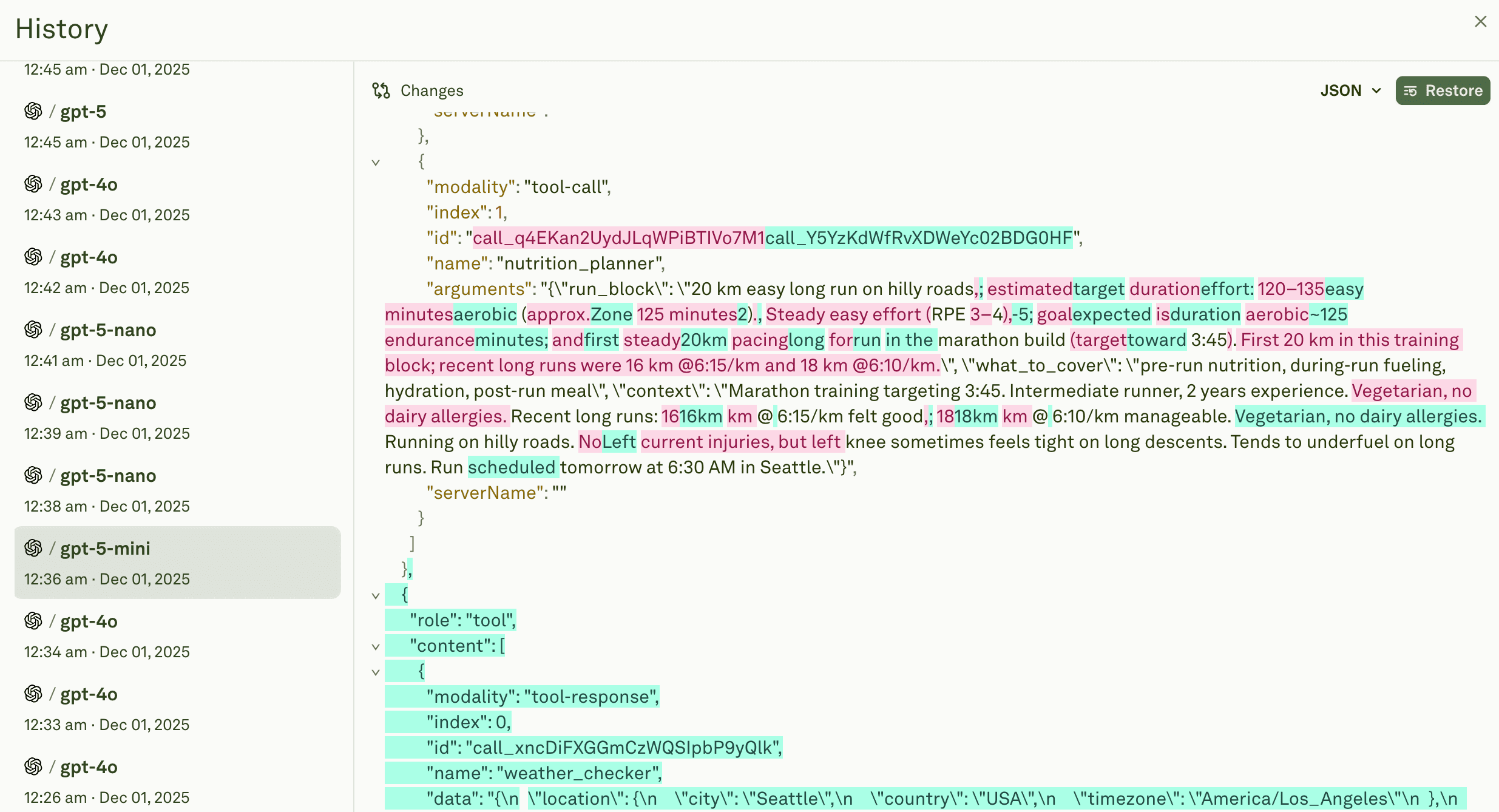
Adaline allows users to rollback previous prompts with a single click.
When production issues occur, speed matters:
Instant Revert
- Click "Rollback" on any previous version.
- Production switches to that version immediately.
- No code changes, no redeployment.
- Downtime measured in seconds, not hours.
Rollback with Confidence
- Full visibility into what you're rolling back to.
- Review diff to understand what will change.
- Rollback is itself versioned. You can undo rollbacks.
Key Strengths
- Only true Git-like versioning: Immutable commits, diffs, full lineage.
- Best deployment workflows: Dev/Staging/Prod environments with promotion.
- Instant rollback: One-click revert to any previous version.
- Version-specific testing: Run evals on specific versions, compare performance.
- Team collaboration: Approval workflows, comments, access controls.
- Complete audit trail: Who deployed what when, full compliance.
- Production-proven: Used by McKinsey, Coframe, Epsilon AI.
Pricing
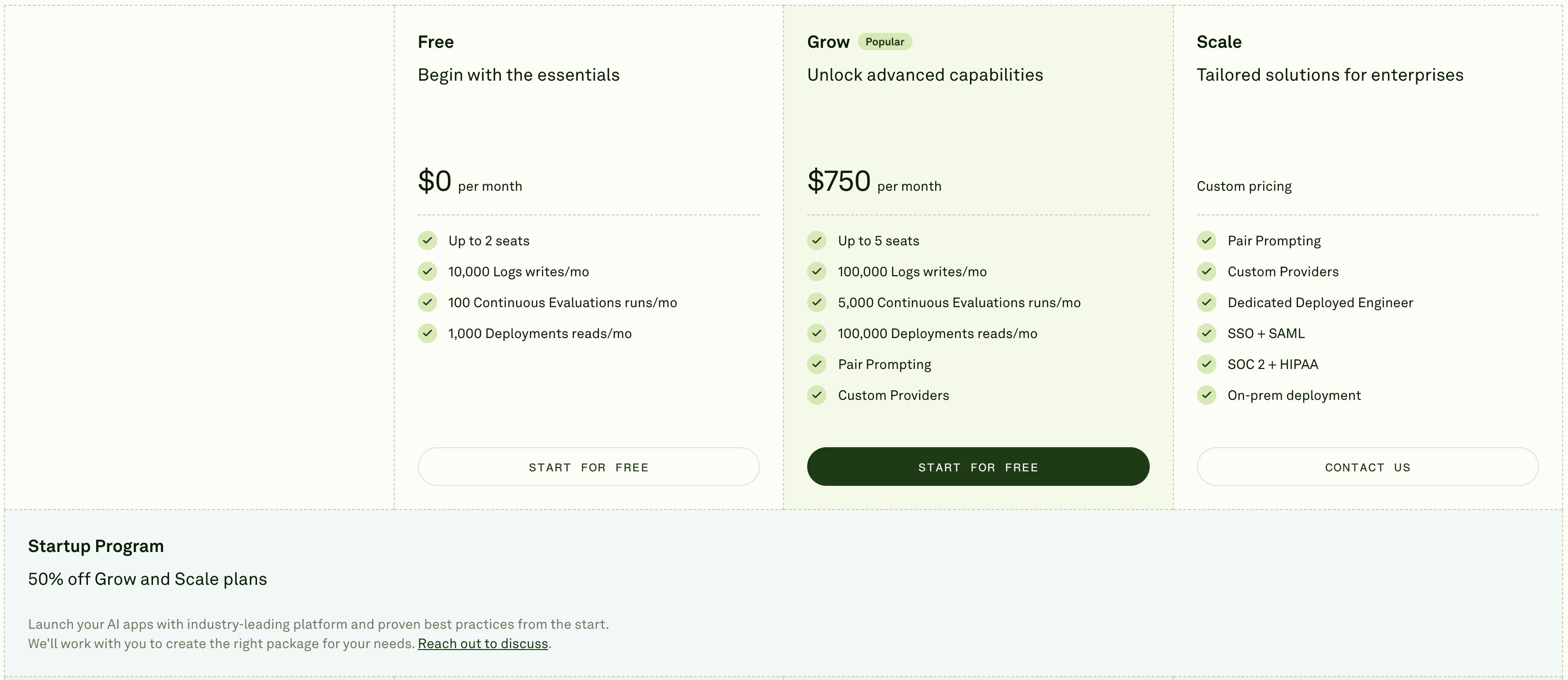
Adaline's pricing.
- Free Tier: 2 seats, basic usage
- Grow Tier: $750/month.
- Enterprise: Custom annual pricing, unlimited seats, SSO, on-premise
Best For
✅ Production teams shipping AI features to customers.
✅ Organizations requiring deployment governance.
✅ Teams that need rapid rollback capability.
✅ Cross-functional teams (PMs + engineers).
✅ Anyone serious about treating prompts like production code.
2. Braintrust
Overall Rating: 8.0/10
Quick Summary:
Braintrust provides solid prompt versioning tightly integrated with its evaluation framework. If your priority is connecting version changes to quality metrics, Braintrust excels—though it lacks environment-based deployment workflows.
Key Strengths
- Version-evaluation integration: Every version is automatically linked to eval results.
- Performance comparison: Side-by-side version analysis with quality scores.
- CI/CD GitHub Action: Run evals on version changes automatically.
- Excellent Playground++: Non-technical users can create versions easily.
- Unlimited users on Pro: $249/mo includes entire team.
Key Limitations
- No environment workflows: No Dev/Staging/Prod separation.
- Limited rollback: Can revert but not as seamless as Adaline.
- Not Git-like: Versions feel more like snapshots than commits.
- Closed source: Can't self-host without an Enterprise deal.
- Higher base price: $249/mo vs. competitors' lower tiers.
Pricing
- Free Tier: 1M spans, 10k scores, 14-day retention
- Pro Plan: $249/month (unlimited users)
- Enterprise: Custom pricing
Best For
- Large teams (>10 people) needing version tracking.
- Evaluation-heavy workflows prioritizing quality metrics.
- Teams are comfortable with manual deployment processes.
Why Not #1?
Braintrust versions prompts excellently but doesn't provide deployment governance. You can track versions and compare them, but you can't promote v3.2 from Staging → Production with one click. You're back to manual deployment.
Strong evaluation-version integration. Weak deployment workflows.
3. LangSmith
Overall Rating: 7.5/10
Quick Summary:
LangSmith's prompt versioning emerged from its tracing infrastructure. If you're deeply invested in LangChain and want versioning that integrates with traces, LangSmith works well. For everyone else, the value diminishes.
Key Strengths
- LangChain Hub integration: Native versioning for LangChain prompts.
- Trace-to-version linking: See which version generated each trace.
- Datasets from traces: Convert production traces into versioned test sets.
- Large community: 100k+ members, extensive examples.
- Good diff view: Clear visualization of version changes.
Key Limitations
- LangChain lock-in: Optimized for one framework only.
- No deployment workflows: No environment separation or promotion.
- Version management limited: Feels like an add-on to observability.
- No rollback mechanism: Must manually redeploy previous versions.
- Expensive at scale: Trace costs compound with usage.
Pricing
- Developer Plan: Free (5,000 traces/month, 14-day retention)
- Plus Plan: $39/user/month + trace costs
- Enterprise: Custom pricing
Cost Reality: For 100k traces/month = $195/mo (seats) + $275/mo (traces) = $470/mo for a 5-person team.
Best For
- Teams exclusively using LangChain/LangGraph.
- Developer-only workflows (no PM involvement).
- Teams prioritizing observability over deployment.
Why Not #1?
LangSmith tracks versions but doesn't govern deployments. You know what changed, but you can't promote versions through environments or roll back with one click. It's versioning as an observability feature, not a core capability.
Good for LangChain teams. Incomplete for deployment governance.
4. Humanloop
Overall Rating: 7.0/10
Quick Summary:
Humanloop provides prompt versioning designed for large, complex prompt libraries. If you have hundreds of prompts across multiple projects and need organizational control, Humanloop's structure helps—at a premium price.
Key Strengths
- Library organization: Hierarchical structure for extensive prompt collections.
- Version comparison UI: Polished interface for reviewing changes.
- Collaboration features: Comments, review workflows, and approval gates.
- Enterprise compliance: SOC 2, SSO, RBAC out-of-the-box.
- Human-in-the-loop: Version review workflows for subject matter experts.
Key Limitations
- No deployment workflows: Must build environment management separately.
- Complex pricing: Enterprise-focused, expensive for small teams.
- Steep learning curve: Feature-heavy interface overwhelms simple use cases.
- Limited rollback: Can revert but requires manual redeployment.
- Developer experience: SDK is less polished than competitors.
Pricing
Custom pricing (enterprise-focused, not publicly listed)
Best For
- Large enterprises with 100+ prompts.
- Organizations requiring compliance features (SOC 2, HIPAA).
- Teams prioritizing library organization over deployment speed.
Why Not #1?
Humanloop organizes versions well but doesn't deploy them. You can manage a large prompt library, review changes collaboratively, and maintain compliance—but when it's time to ship to production, you're on your own.
Excellent for library management. Incomplete for deployment.
5. PromptLayer
Overall Rating: 6.5/10
Quick Summary:
PromptLayer automatically captures every prompt change with minimal setup. It's the easiest way to start versioning but lacks the depth and deployment features that production teams need.
Key Strengths
- Automatic versioning: Every LLM call creates a version, no effort required.
- Fast setup: Add wrapper, start versioning in minutes.
- Clean UI: Simple version browsing and comparison.
- Affordable: $49/mo Pro plan accessible for startups.
- Multi-provider: Works with OpenAI, Anthropic, others.
Key Limitations
- No deployment workflows: No environment separation at all.
- No rollback mechanism: Can see old versions but can't deploy them.
- Limited metadata: Basic tracking, not Git-like commits.
- No testing integration: Can't run evals on specific versions.
- Passive only: Captures versions but doesn't govern them.
Pricing
- Free Plan: $0 (2.5k requests/mo, 5 users)
- Pro Plan: $49/month (same limits + unlimited workspaces)
- Team Plan: $500/month (25 users, 100k+ requests)
- Enterprise: Custom pricing
Best For
- Small teams (<5 people) just starting with versioning.
- Prototype/experimental projects.
- Teams wanting visibility without governance.
- Budget-conscious startups testing the waters.
Why Not #1?
PromptLayer captures version history passively but doesn't help you manage it. You can see what changed, but you can't promote v4.2 from dev to production or roll back v5.0 when it breaks. It's version logging, not version control.
Good for version awareness. Insufficient for production governance.
Quick Comparison Matrix
Why Adaline Wins for Production Teams
After testing all five platforms, one truth is undeniable: most tools track version history, but only Adaline governs version deployment.
Here's why that matters:
The Problem with History-Only Versioning
LangSmith, Humanloop, and PromptLayer all show you version history. You can see:
- What changed between the different versions?
- Who made the change?
- When it happened?
That's useful. But it’s incomplete.
What they can't do:
- Separate dev from production versions.
- Test v4 in Staging before Production.
- Promote v4 → Production with one click.
- Roll back to v3 instantly when v4 breaks.
- Run automated tests per version.
- Require approval before production deployment.
Without these capabilities, you’re stuck with manual deployment processes. You know what changed, but you can't control how changes reach production.
What Complete Version Control Looks Like
Adaline delivers four things no competitor provides:
- Environment Isolation
Dev/Staging/Prod are separate version spaces. Wild experiments in Dev never touch Production. Staging is where versions get validated before customers see them. - Safe Promotion Workflows
Moving v5.0 from Dev → Staging → Production is systematic, tested, and auditable. Not "copy code and hope it works." - Instant Rollback
When v5 breaks production at 2 AM, clicking "Rollback to v4" restores service in 30 seconds. No debugging, no code changes, no waiting. - Version-Test Integration
Every version runs through automated test suites. Compare v5 vs. v4 with 500 test cases. See which performs better. Deploy with data, not guesses.
Conclusion
If you just need to log version history, PromptLayer or LangSmith work fine.
If you're building production AI features that matter—features customers depend on, features that drive revenue—you need more than logs. You need governance.
Adaline is the only prompt versioning tool built for production deployment workflows.