
AI systems have traditionally been isolated from external data, limiting their capabilities in real-world applications. Model Context Protocol (MCP) changes this dynamic completely, creating standardized pathways for Claude and other Large Language Models (LLMs) to interact with external tools and data sources. This architectural breakthrough transforms Claude from a conversational assistant into a powerful agent capable of accessing your GitHub repositories, databases, and custom tools—all while maintaining robust security boundaries.
The protocol follows a client-server architecture built on JSON-RPC 2.0, with well-defined primitives for resources, tools, and prompts. By implementing MCP servers, you establish secure channels for bidirectional communication between Claude and your external systems, enabling sophisticated workflows previously impossible with standard API approaches.
This implementation guide provides everything you need to connect Claude Desktop with custom data sources and function endpoints. You’ll learn to create servers that expose your tools to Claude while maintaining strict security boundaries, leading to more capable AI applications that can interact with real-world systems while preserving user privacy and data integrity.
This article covers:
- 1MCP architecture fundamentals and communication flow
- 2Development environment setup with Python, Claude Desktop, and Docker
- 3Step-by-step implementation of your first MCP server
- 4GitHub integration techniques with personal access tokens
- 5Advanced patterns for tool chaining and security implementation
Understanding model context protocol (MCP) fundamentals
Core architecture of MCP
Model Context Protocol (MCP) is Anthropic’s open standard that creates a standardized way for LLMs to interact with external tools and data sources. MCP follows a three-tier client-server architecture where hosts (LLM applications like Claude Desktop) initiate connections, clients maintain 1:1 connections with servers, and servers provide clients context, tools, and prompts.
This architecture enables seamless communication while maintaining clear security boundaries. Each component has distinct responsibilities within the MCP ecosystem.
Protocol specifications
MCP builds on JSON-RPC 2.0 as its messaging foundation. The protocol defines several message types for communication:
- Requests: Messages that expect a response
- Responses: Successful results or error messages
- Notifications: One-way messages requiring no response
All exchanges follow standardized patterns for initialization, message exchange, and termination. This structured approach ensures compatibility across different implementations while maintaining flexibility.
Transport layer options
MCP supports multiple transport mechanisms to accommodate different deployment scenarios:
- Stdio transport: Uses standard input/output streams for local process communication
- HTTP with SSE transport: Uses Server-Sent Events for server-to-client messages and HTTP POST for client-to-server communication
Both transports use the same JSON-RPC 2.0 message format, allowing for consistent implementation regardless of the communication channel.
Security model
MCP implements a security-first design with strict permission boundaries. Key security principles include:
- Servers receive only necessary contextual information
- Full conversation history stays with the host
- Each server connection maintains isolation from others
- Cross-server interactions are controlled by the host
- User consent is required before tool usage
These boundaries protect sensitive data while enabling powerful functionality through standardized interactions.
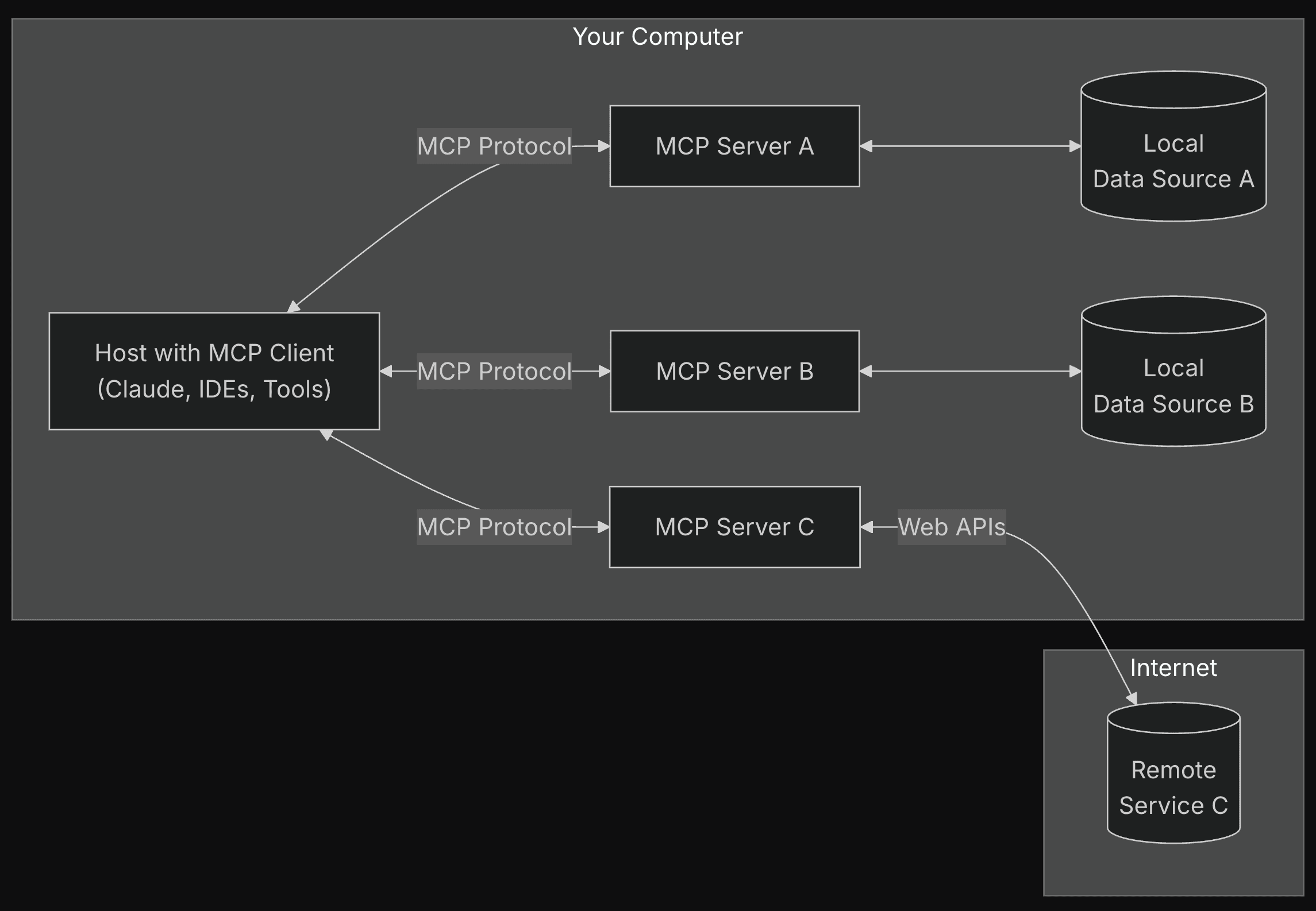
Diagram showing the MCP architecture with hosts, clients, and servers with security boundaries between components | Source: MCP Documentation
Now that we understand the core principles behind MCP, let’s explore how the communication flow works in more detail.
MCP architecture and communication flow
Server primitives
The Model Context Protocol (MCP) is built around three core server primitives that form the foundation of the architecture:
- 1Resources: File-like data that can be read by clients, such as API responses, file contents, database records, or binary data encoded as Base64 strings.
- 2Tools: Executable functions that LLMs can call with user approval to retrieve information or perform actions in external systems.
- 3Prompts: Templated messages and workflows that help users accomplish specific tasks.
Communication protocol structure
MCP follows a client-server architecture with clearly defined communication patterns:
Message types: The protocol uses JSON-RPC 2.0 with three primary message formats:
- Requests: Bidirectional messages expecting a response
- Responses: Success results or errors matching specific request IDs
- Notifications: One-way messages requiring no response
Transport options: MCP supports multiple transport mechanisms:
- Stdio transport: Uses standard input/output for local processes
- HTTP with SSE transport: Server-Sent Events for server-to-client messages and HTTP POST for client-to-server
Request-response flow
The typical communication sequence in MCP follows these steps:
Initialization:
- Client sends an initialize request with protocol version and capabilities
- Server responds with its supported capabilities
- Client confirms with an initialized notification
Session communication:
- Clients discover available resources through the resources/list endpoint
- Resources are accessed via resources/read requests
- Tool execution follows a request-response pattern
- Servers can send notifications about resource updates
Termination:
- Either party can terminate the connection cleanly
- Error conditions are handled through standardized error codes
Architectural advantages
MCP's architecture provides several key technical advantages:
- Isolation: Each server operates independently with focused responsibilities
- Capability negotiation: Clients and servers explicitly declare supported features
- Security boundaries: Servers receive only necessary contextual information
- Stateful sessions: The protocol maintains state across the communication sequence
- Extensibility: The architecture supports progressive enhancement with new capabilities
This standardized communication flow enables seamless integration between LLM applications and a wide range of external tools and data sources. With the architecture and communication patterns established, now let's learn how you can implement your first MCP.
Implementing your first MCP server
Getting started with MCP
The Model Context Protocol allows you to create servers that connect AI systems to your data and tools. Implementing your first server is straightforward with the Python SDK. The SDK handles protocol details so you can focus on your core functionality.
Let’s start with installing uv. uv is the Python package manager, which is written in Rust. You can use brew:
Or,
Now, let’s set up the project. I will now create the directory, virtual environment, and pyproject.toml file.
- 1To create a directory, use the following command
mkdir mcp && cd mcp - 2Now, create a virtual environment using
uv venvand activate it usingsource .venv/bin/activate - 3Now, set up the
pyproject.tomlfile. It centralizes Python project configuration in one place. It stores project metadata like name and version. It specifies the build system for packaging. It manages dependencies for both production and development. It configures development tools such as formatters, linters, and test frameworks. It replaces multiple configuration files with a single, standardized format. It follows the PEP 518 specification. It works with modern build tools like Poetry, Flit, and setuptools. It makes project setup more consistent across the Python ecosystem. It simplifies dependency management for developers. It helps ensure reproducible builds across different environments.
Now, we can install “mcp” from Anthropic using the following command: uv add "mcp[cli]" httpx
After the installation, it is time to write a simple script to help us check the weather forecast (in the US). Why this example? As we know, Claude doesn’t have internet access, but by using the MCP, we can incorporate the internet capabilities. But we must remember that this will only work on Claude desktop app. Because the desktop app can access the script that we write.
So can we do that?
First, we write a weather script.
This code creates a weather information server using FastMCP, a framework for building micro-services. The server provides two main tools: get_alerts and get_forecast.
The get_alerts function fetches active weather alerts for a specified US state by making requests to the National Weather Service (NWS) API, then formats the alerts into readable text. The get_forecast function retrieves weather forecasts for specific latitude/longitude coordinates by first getting grid information from the NWS points endpoint, then fetching and formatting detailed forecast data.
Both functions use a helper method make_nws_request that handles HTTP requests with proper error handling using the httpx library for asynchronous communication. When run, the server operates over standard input/output, ready to respond to weather information requests.
Now we have to download and install Claude for Desktop, which can be downloaded from here.
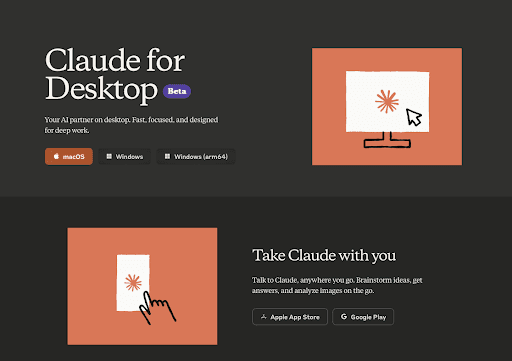
After installation, you must create a config file for Claude for desktop. Make sure that you use the following path in Mac: ~/Library/Application\ Support/Claude/claude_desktop_config.json
After that, add the following code to the file:
Now, all you have to do is to open Claude for Desktop.
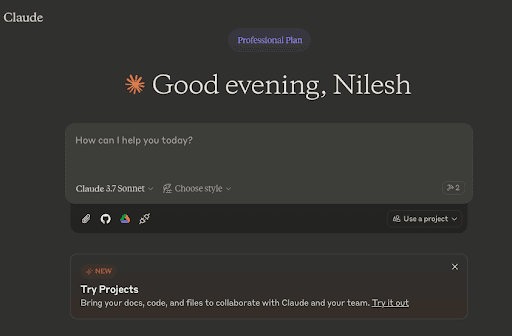
Once you open it, look for the hammer icon on the left-hand side of the chatbox. That indicated whether you have any MCP tools available. Upon clicking, you will find this message.
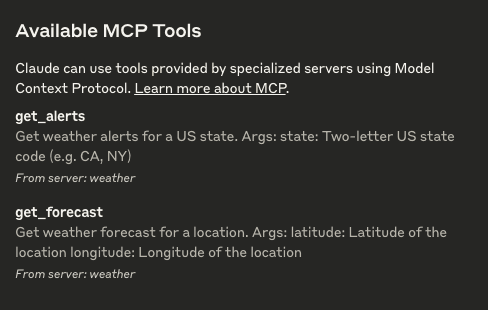
This means you are all set to access the weather API.
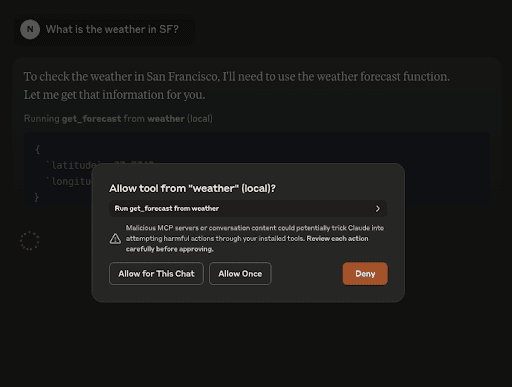
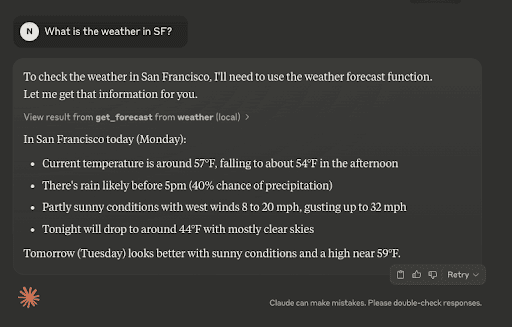
Now, you can ask Claude about the weather and it will provide you with correct information. Let’s try it out.
Also, keep in mind that you will be prompted to give access to Claude to use the weather API. Just click on ‘Allow for this chat,’ and you are good to go.
After you give the permission to Claude, it will generate your response.
Your first MCP server implementation opens up powerful possibilities for AI integration with your data and services. By providing structured access, you enable Claude to perform tasks with your specific resources while maintaining security through well-defined interfaces.
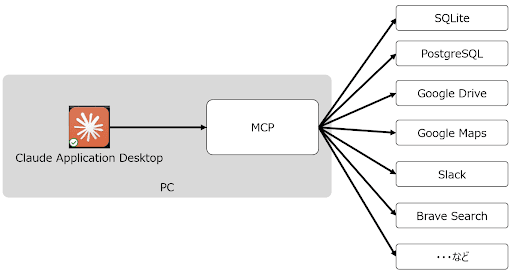
Illustration of how the Claude desktop application connects to various applications via MCP
Now that you’ve created a basic MCP server, let's explore how to integrate more complex services like GitHub to enhance Claude's capabilities.
GitHub integration via MCP
Setting up personal access tokens
You first need to generate a personal access token to integrate GitHub with Claude through Model Context Protocol (MCP). Navigate to GitHub Settings > Developer Settings > Personal Access Tokens and create a token with appropriate repository permissions. This token serves as your authentication method when configuring the MCP server.
Configuring MCP server for GitHub
Add the GitHub server configuration to Claude Desktop’s config file at ~/Library/Application Support/Claude/claude_desktop_config.json. The configuration requires specifying your access token as an environment variable:
Once configured, restart Claude Desktop to establish the connection.
Repository access implementation
The GitHub MCP server exposes tools that enable Claude to read repository content. These include functions for listing repositories, browsing file structures, and retrieving file contents. Through these tools, Claude can analyze codebases and provide context-aware assistance.
Code review automation
With GitHub integration, you can implement automated code review workflows. Claude can examine pull requests, analyze code changes, and provide feedback directly through GitHub’s interface. This creates a seamless experience where Claude serves as a technical reviewer, helping identify potential issues before the code is merged.
Best practices for security
When implementing GitHub integration, follow these security best practices:
- Use tokens with minimal required permissions
- Store tokens securely as environment variables
- Regularly rotate access tokens
- Configure read-only access for most use cases
- Monitor and audit API usage regularly
This integration transforms Claude from a general assistant to a context-aware development companion that understands your codebase.
Beyond basic implementations and GitHub integration, you can leverage several advanced patterns to build more sophisticated MCP-enabled applications.
Advanced MCP implementation patterns
Tool chaining techniques for complex workflows
MCP enables sophisticated multi-step workflows through strategic tool chaining. Rather than isolated tool calls, developers can construct sequences where outputs from one tool feed into another. This pattern creates powerful pipelines for complex tasks. A well-designed chain maintains context across steps, preserving important data while passing only what’s needed to the next tool.
Performance optimization strategies
Implementing caching mechanisms dramatically improves MCP performance. Frequently requested resources can be stored temporarily, reducing redundant operations. Asynchronous handling of operations prevents blocking, which is especially useful when tools perform time-consuming tasks. This pattern allows the client to continue processing while waiting for results.
Rate limiting implementation
To ensure API sustainability, implement exponential backoff strategies. When rate limits are encountered, the system automatically waits progressively longer before retrying. This pattern prevents overwhelming external services while maximizing throughput during normal operation periods. Proper rate limiting maintains system stability under high load.
Error recovery strategy implementation
Robust error handling is essential for maintaining MCP connections. Implement comprehensive recovery mechanisms that can handle various failure scenarios. This pattern includes intelligent retries with appropriate backoff algorithms and graceful degradation when services become unavailable. Effective error strategies preserve user experience during inevitable failures.
While powerful functionality is important, securing your MCP implementation is equally crucial. Let's explore key security implementation strategies.
MCP security implementation
Token-based authentication strategies
MCP servers implement token-based authentication for secure access control. This follows OAuth 2.1 standards with strict adherence to security best practices. Authentication tokens must be included in authorization headers rather than query strings. The protocol supports dynamic client registration to eliminate manual client ID management.
Environment variable protection
Credentials should never be hardcoded. Instead, MCP servers use environment variables to securely manage access tokens and API keys. In containerized implementations, these credentials are passed through Docker environment settings, maintaining isolation between the credential store and execution environment.
Permission scoping techniques
MCP enforces granular permission scoping to limit tool access according to specific requirements. Servers can implement read-only access for sensitive resources while providing more permissive access to others. User consent requirements are built into the protocol. For enhanced security, MCP servers should implement proper access controls to validate resources before granting access.
Conclusion
Model Context Protocol represents a significant advancement in making LLMs like Claude truly useful for real-world applications. By enabling standardized interactions with external tools and data sources, MCP transforms Claude from a conversational AI into a capable agent that can work with your specific systems.
The protocol's client-server architecture provides clear security boundaries while allowing flexible implementation options. Whether integrating with GitHub repositories, accessing internal databases, or creating custom tool endpoints, MCP offers a structured approach that maintains data privacy while expanding AI capabilities.
For product teams, MCP opens possibilities for creating more context-aware AI features that can directly interact with your product's data and functionality. AI engineers will appreciate the clear protocol specifications and reference implementations that simplify integration. From a strategic perspective, MCP represents an opportunity to create AI experiences that truly understand your users' context and can take meaningful actions within your systems.
By following the implementation patterns outlined in this guide, you can quickly move from concept to production with MCP-powered Claude integrations that deliver tangible value to your users.