
Introduction
GPT-2 marked a turning point in language models. Released in early 2019, it showed that a single transformer-based model could generate coherent paragraphs, answer questions, and even write simple stories. At the time, this felt almost magical. Today, we take large language models (LLMs) for granted. Yet, the lessons from GPT-2 still matter.
Why start with GPT-2?
First, it’s lean.
Unlike modern LLMs that span hundreds of billions of parameters, GPT-2 runs comfortably on a single GPU. That makes it ideal for hands-on learning.
Second, its code and weights are openly available. You can inspect every line, every weight, and every step of fine-tuning. That transparency is rare in AI today.
Third, the core transformer architecture in GPT-2 remains at the heart of models like GPT-4, Llama 2, and beyond. By studying GPT-2’s attention mechanisms, tokenization strategies, and training pipelines, you build the foundation needed to tackle bigger, more complex models.
In this tutorial, we’ll walk through setting up GPT-2 with PyTorch and Hugging Face’s Transformers library. You’ll see how to prepare datasets, fine-tune the model, and generate text. Along the way, you’ll learn best practices that apply to any LLM project—no matter the model size.
Environment Setup & Device Configuration for GPT-2 Training
Before you write a single line of model code, let’s prepare your workspace. First, install PyTorch and Hugging Face’s Transformers:
With dependencies in place, import the core libraries:
Here’s what each import does:
torch: The engine for tensors and GPU acceleration.Dataset&DataLoader: Wrap your text data in a class, then batch and shuffle it.GPT2Config: Define or tweak GPT-2’s architecture without loading weights.GPT2Tokenizer: Convert raw text into token IDs the model understands.GPT2LMHeadModel: The pretrained language model, ready for fine-tuning or inference.TrainingArguments&Trainer: High-level APIs to manage training loops, checkpoints, and logging.DataCollatorForLanguageModeling: Dynamically mask or shift tokens for language-model objectives.
Next, choose your device:
This line lets PyTorch detect CUDA GPUs—if available—and fall back to CPU otherwise. Move your model and batches onto device to harness hardware acceleration. That’s it. Your environment is now configured to train and run GPT-2.
Preparing Custom Text Datasets with Hugging Face Tokenizer
First, load your raw text with 🤗 Datasets.
This picks GPU when available, else CPU. Next, wrap texts in a PyTorch-friendly class:
Here, every text string converts into fixed-size token IDs and attention masks. Truncation avoids overflow; padding keeps batch shapes uniform.
Finally, load and split your dataset:
This function pulls in WikiText, filters out empty lines, and returns two ready-to-use datasets. You’re set to batch, train, and experiment—no manual token slicing required.
Initializing GPT-2 Model & Tokenizer: Best Practices
Before you fine-tune GPT-2, it’s essential to initialize the model and tokenizer correctly. These components must stay aligned—especially when special tokens like padding are involved. In GPT-2’s case, a pad_token isn’t set by default, so we map it to the eos_token to prevent training errors during batching and masking.
We wrap all this setup in a function:
Next, we define the full training routine using Hugging Face’s Trainer:
This training pipeline handles evaluation, checkpointing, mixed-precision training, and more. It's flexible enough to scale and simple enough to extend—ideal for both experimentation and production.
Fine-Tuning GPT-2 on WikiText
With your model, tokenizer, dataset, and training loop ready, it’s time to kick off fine-tuning. GPT-2 was originally trained on a large, diverse corpus, but to make it useful for a specific domain—or just to understand how training dynamics work—you’ll often want to continue training on a smaller, curated dataset.
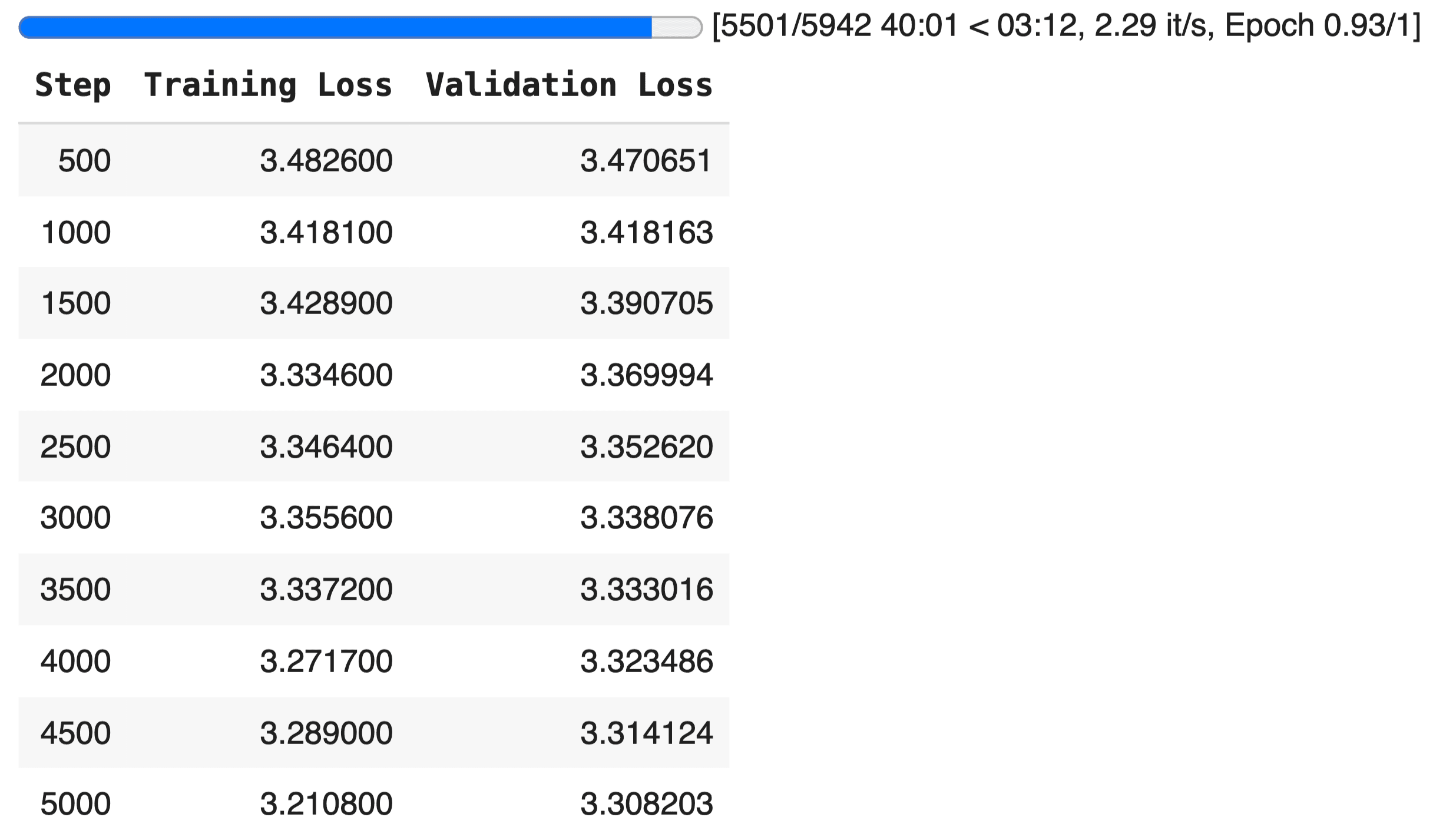
In this example, we use the WikiText-2 corpus, a clean subset of Wikipedia articles commonly used for language modeling tasks. Fine-tuning on WikiText helps the model adapt its predictions to more formal, structured writing while demonstrating how loss, performance, and generalization evolve.
The training begins with a simple call:
Here, we lower both the epoch count and batch size to make the training script lightweight and reproducible—even on limited hardware. The output_dir parameter tells the script where to save the model and tokenizer checkpoints.
Once training completes, you’ll have a fine-tuned version of GPT-2 saved locally—ready for evaluation, text generation, or integration into a downstream product.
Generating Text Your Custom GPT-2 Model
Once your GPT-2 model is fine-tuned, the next step is putting it to use—by generating text from a custom prompt. This is where language models become interactive, allowing you to test how well your model has learned the patterns in your dataset.
Here's a simple function that does exactly that:
A few important points:
temperaturecontrols randomness. Lower values produce more focused, predictable text; higher values increase creativity.do_sample=Trueenables stochastic decoding, making output less repetitive.pad_token_idensures the model doesn't crash if input is shorter than max length.
To run the generator:
This simple block lets you test different prompts and explore how your fine-tuned model responds to real-world queries.
Conclusion
GPT-2 may be old, but it’s far from irrelevant. Its simplicity makes it the perfect playground for learning how LLMs work under the hood. In this guide, you trained it end-to-end—from raw text to generation. What you’ve learned here applies to larger models too. If you’re a product builder or AI engineer, this isn’t just a tutorial. It’s your blueprint for understanding and shipping smarter AI-powered features.