

How it works
When you configure a variable with a Prompt source:- Selection — You choose another prompt from your project as the variable source.
- Execution — At runtime, the system executes the referenced prompt first.
- Integration — The output of the referenced prompt becomes the value of your variable, injected into the parent prompt before it is sent to the model.
Set up a prompt variable
1
Create a variable
Add a
{{variable_name}} placeholder in your prompt. The variable appears in the Variable Editor.2
Select Prompt as the source
In the Variable Editor, click on the variable and select Prompt as the source type.
3
Choose the referenced prompt
Select a prompt from the dropdown. The system will automatically execute it and use its output as the variable value.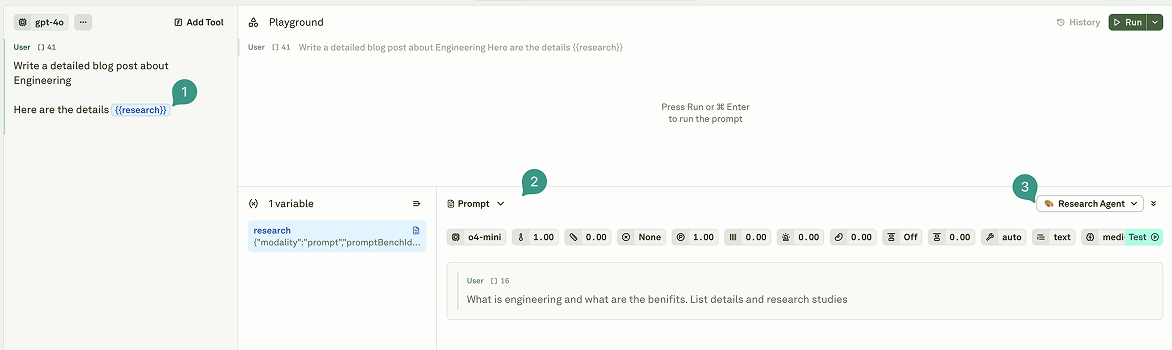
Data from the parent prompt’s linked dataset is automatically passed to the referenced prompt. Child prompts can access any column available in the parent dataset.
Key capabilities
Prompt variables provide powerful orchestration features:Dataset integration
When prompt variables are used with a linked dataset, they function as dynamic columns:- Row-level execution — Each dataset row triggers its own unique prompt execution, producing a distinct result per row.
- Sequential vs. parallel — Dependent variables (where one relies on the result of another) run sequentially. Independent variables run in parallel.
- Result persistence — Outputs are stored in the dataset cells and can be used for subsequent evaluations.
Data flow
Child prompts can reference any column available in the parent dataset. For example, if your parent prompt has a dataset with columnsuserId and query, the child prompt can access both {{userId}} and {{query}}.
Execution behavior
Error handling
Use cases
Prompt variables are ideal for:- Multi-step reasoning — Break complex tasks into smaller, focused prompts that execute in sequence (e.g., summarize a document, then classify the summary).
- Agent workflows — Build agent-like systems where one prompt’s output informs the next decision or action.
- Modular design — Create reusable prompt components that can be combined in different configurations.
- Output transformation — Pass the raw output of one prompt through another for formatting, translation, or filtering.
Best practices
- Limit nesting to 2–3 levels — Deeper hierarchies degrade performance and make debugging difficult.
- Use descriptive names — Name variables like
{{user_purchase_history}}rather than{{var1}}so that the prompt chain is self-documenting. - Test child prompts independently — Verify that each prompt in the chain works correctly on its own before connecting them.
- Watch for circular dependencies — Although Adaline detects these automatically, designing your prompt architecture to avoid them simplifies debugging.
Next steps
Use APIs in Prompts
Fetch live data from external endpoints at runtime.
Use Variables in Prompts
Learn about all variable types and sources.