

Data export
Project export
You can export individual projects from the Adaline Dashboard. A project export produces a JSON file containing the project’s prompts, datasets (structure and rows), evaluators, variables, tools, and deployment environment configuration.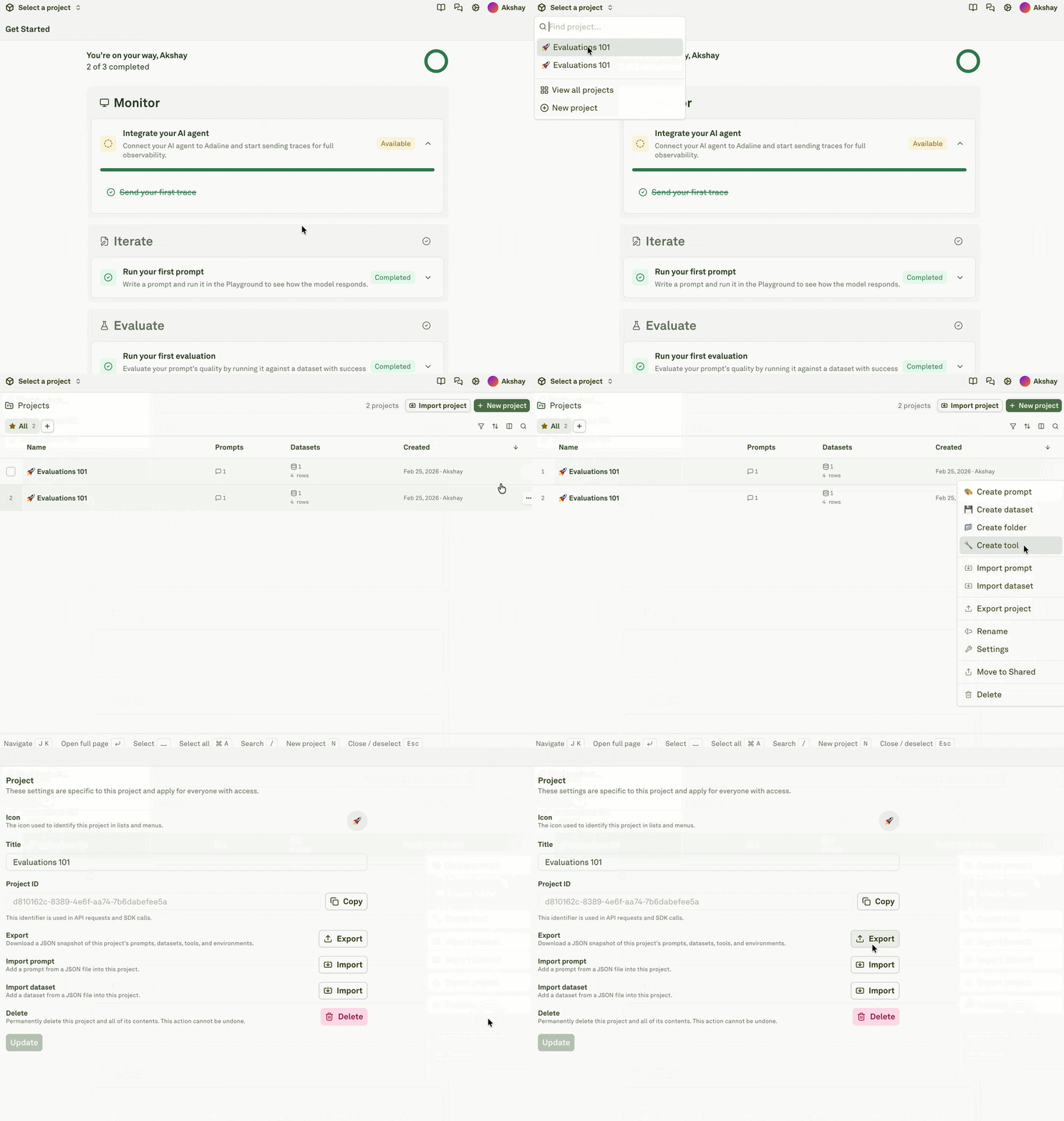
Project exports include configuration and dataset content but do not include log data. To export logs, contact support@adaline.ai.
Workspace-level export
Currently there is no self-service workspace-level export feature available. You can use the Adaline API to programmatically list and retrieve projects, prompts, datasets, etc. or contact support@adaline.ai.Data retention
Adaline retains your data according to your plan’s retention policy. Retention periods vary by billing plans. Retention applies to all data stored in the platform, including:- Production logs — traces, spans, and their associated inputs, outputs, and metadata
- Project configurations — prompts, datasets, evaluators, and deployment environments
- Evaluation results — scores, evaluator outputs, and run history
- Audit logs — authentication events, resource operations, and configuration changes
Production data hygiene
Before sending data into Adaline:- Decide which traces, spans, tags, attributes, and payloads are allowed.
- Avoid sending API keys, access tokens, secrets, and raw credentials.
- Prefer stable internal labels over raw personal identifiers.
- Keep sensitive source-system IDs out of screenshots and docs.
- Mark production-derived dataset rows clearly so reviewers understand their source.
- Use your organization’s policy for user content, tenant metadata, and retention.
Data deletion
Project deletion
Deleting a project in Adaline permanently deletes all of the project’s resources — folders, prompts, datasets, evaluators, evaluations runs, deployments, environments, logs, etc. This action cannot be undone.Workspace-level deletion
Currently there is no self-service workspace-level deletion feature available. You must contact support@adaline.ai to request workspace deletion.Before deleting a project
Confirm:- Production applications no longer read deployments from the project.
- API keys and automation no longer write traces to the project.
- Webhooks or CI/CD jobs no longer depend on its deployment events.
- Regression datasets and evaluators have been migrated if they are still useful.
- Prompt versions and deployment history have been exported if your team needs an audit record.