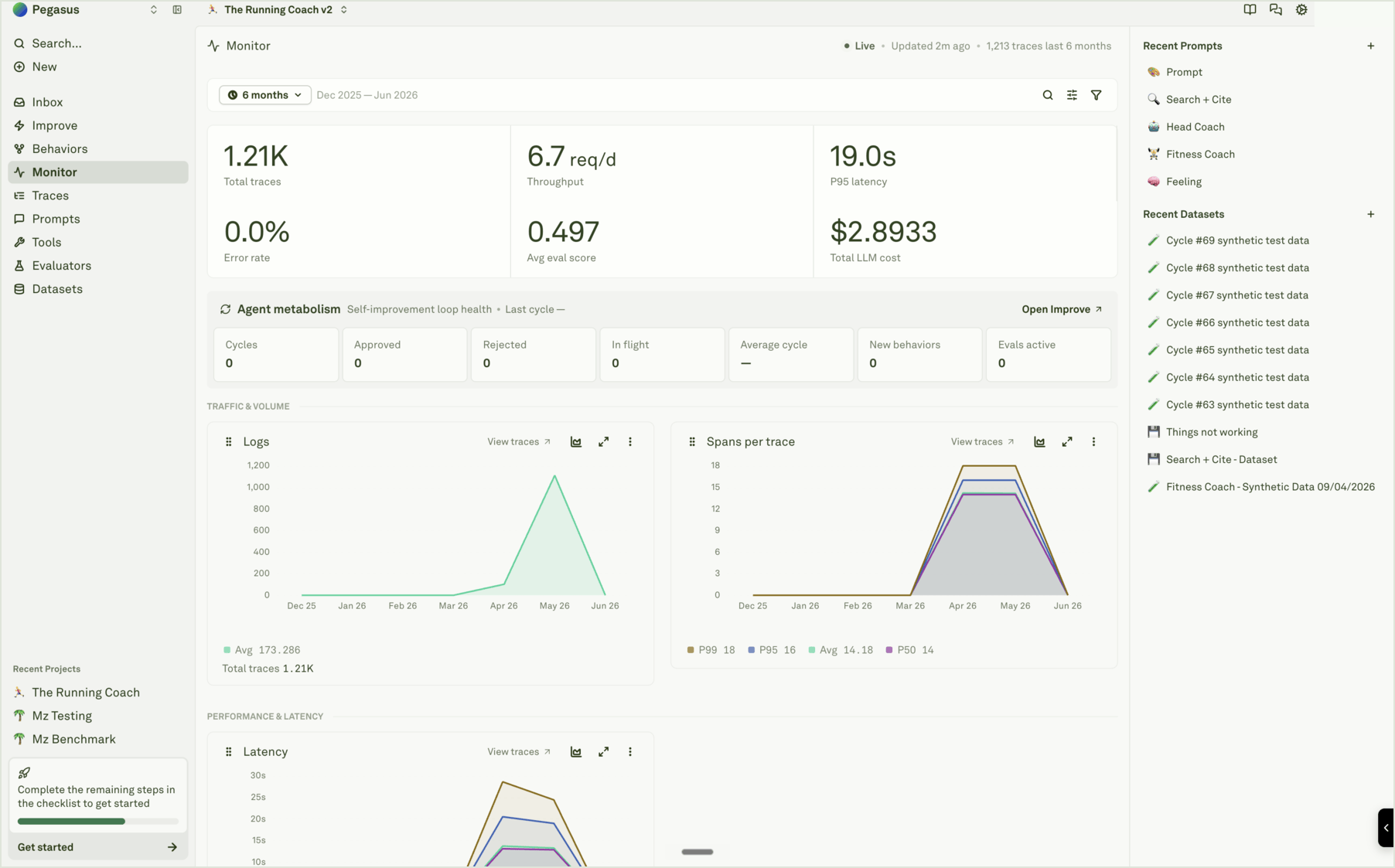
The Monitor pillar gives you complete visibility into your AI agents in production. Once your application is instrumented, every request flows into Adaline as structured telemetry — traces, spans, and metadata — that you can analyze, filter, and act on. The workflow is: instrument your application, analyze traces and spans to understand what is happening, use charts to spot trends, run continuous evaluations to check quality automatically, and close the loop by building datasets from real traffic and improving your prompts.

Traces and spans

Viewing a trace in the Monitor pillar Traces and spans are the building blocks of observability in Adaline. A trace represents a complete end-to-end request flow through your AI agent — from the moment a user sends a message to the final response. Each trace contains one or more spans, where each span represents an individual operation: an LLM call, a tool execution, an embedding generation, a retrieval query, or any custom step in your pipeline. Trace object: a primary block containing properties (name, status, timing, sessionId, tags, attributes) that branches into child Span nodes in a tree structure Span object: a single operation node branching into Identity (name, status, timing), Content (input/output with 8 type variants), and Context (tags, attributes, events) Adaline visualizes traces in two modes — a tree view showing hierarchical parent-child relationships between spans, and a waterfall view showing spans as a timeline that reveals concurrency and sequential dependencies. Click into any span to inspect the full details: input messages, model response, token counts, cost, latency, variables, metadata, and continuous evaluation scores. Spans come in several types — Model (LLM inference), Tool (function calls), Embedding, Retrieval (RAG and vector search), Function (custom logic), Guardrail (safety checks), and Other. Each type captures the metrics most relevant to that operation, giving you granular visibility into every step of your workflow. Analyze Log Traces covers trace visualization, inspection, and metadata. Analyze Log Spans covers span types, detail panels, and LLM-specific analysis. Filtering traces and spans in Adaline As log volume grows, filters and search become essential for finding the signals that matter. Adaline provides a comprehensive filter system that works across both traces and spans — you can filter by time range, status, duration, cost, tags, attributes, and session ID, and combine multiple filters to narrow results progressively. Filters unlock powerful workflows: search by a specific user_id to debug a user’s conversation, filter by session_id to reconstruct a multi-turn chat, surface negative user feedback via tags, find expensive requests that exceed cost thresholds, isolate traffic by deployment environment, or catch quality regressions through evaluation scores. The metadata you attach during instrumentation — tags, attributes, session IDs, and user feedback — becomes the vocabulary you use to slice and search your logs. Filter and Search Logs covers all available filters, common use cases, attribute patterns, and best practices for combining filters.

Charts

Viewing charts in the Monitor pillar Charts provide aggregated, time-series views of your AI agent’s performance — automatically generated from the traces and spans flowing into Adaline. The dashboard tracks six key metrics: log volume, latency, input tokens, output tokens, cost, and evaluation score. Each metric supports Avg, P50, P95, and P99 aggregations, so you can monitor both typical behavior and tail-end outliers. Use charts to spot operational patterns at a glance: latency spikes that indicate provider issues, cost increases from longer prompts, eval score drops signaling quality regressions, or traffic surges from a new feature launch. Click on any data point to drill down into the underlying traces for that time period — moving from a high-level trend to the specific requests that caused it. Analyze Log Charts covers all available metrics, percentile aggregations, time window selection, and drill-down workflows.

Continuous evaluations

Configuring continuous evaluation sample rate Batch evaluations test against a fixed dataset — but production traffic brings inputs you never anticipated. Continuous evaluations solve this by automatically assessing the quality of your deployed prompts on live traffic. Configure a sample rate (0 to 1) and attach evaluators to a prompt, and Adaline evaluates a percentage of incoming LLM spans using the same evaluator types available in the Evaluate pillar: LLM-as-a-Judge, JavaScript, Text Matcher, Cost, Latency, and Response Length. Evaluation scores are attached directly to spans and surface in the span detail panel, the trace view, and the Avg eval score chart. You can also override the sample rate on individual spans via the SDK, API, or proxy — forcing evaluation on high-priority requests regardless of the configured rate. Setup Continuous Evaluations covers sample rate configuration, evaluator setup, override methods, and best practices.

Closing the loop

The Monitor pillar connects back to Iterate and Evaluate through two workflows: Two workflows from Monitor: build datasets and improve prompts Build datasets from logsFilter to the logs that matter, then add spans to datasets in a single click. Input variables and outputs are extracted automatically into dataset columns. Different filters let you build golden datasets from best responses, regression datasets from fixed issues, edge-case datasets from unusual inputs, or failure datasets from current problems. Add annotation columns so human feedback lives alongside the data. Use logs to improve prompts — From any span, open the exact request in the Playground with the same messages, model settings, variables, and tools used in production. Reproduce the issue, iterate on a fix, add the case to a dataset as a regression test, configure an evaluator to catch the issue automatically, verify with an evaluation run, and deploy the improved prompt.

Analyze Log Traces

Inspect end-to-end request flows.

Filter and Search Logs

Find the logs that matter with filters and metadata.

Analyze Log Charts

Monitor trends with aggregated analytics.

Setup Continuous Evaluations

Automated quality checks on live data.