Every prompt in Adaline is built from messages. The Editor provides a structured, role-based interface for composing these messages — giving you precise control over how the model interprets your instructions.

Roles and content blocks

Each message has two components:
  1. Role — Specifies who is speaking in the conversation.
  2. Content block — Contains the actual text, images, or other content.
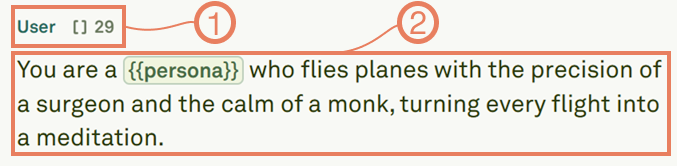
Message structure showing roles and content blocks Choose from the following roles:
RolePurpose
SystemSets the overall instructions, context, and behavioral guidelines for the model.
UserRepresents end-user inputs — the questions or requests sent to the model.
AssistantDefines the model’s responses. Use this in multi-shot prompts to demonstrate expected output format.
ToolContains tool responses to tool calls. Used when building prompts with tool interactions.
The role determines how the model treats the message, while the content block holds what is actually sent — whether that is text, images, PDFs, or a combination.

Next steps

Use Text in Prompts

Compose text content with variables, comments, and structured formatting.

Use Images in Prompts

Add image inputs for multi-modal prompts.