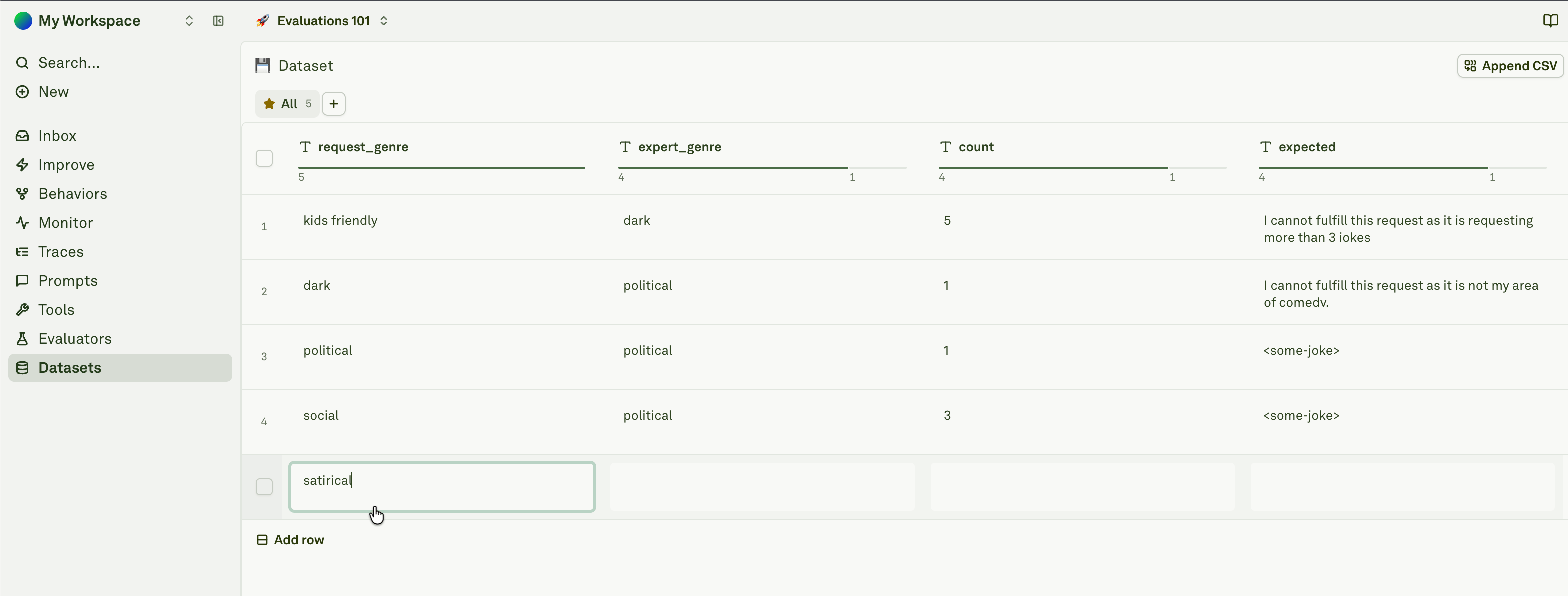
Datasets store the examples Adaline uses to test prompts. They can contain hand-written cases, CSV imports, production trace examples, generated cases, and regression rows created from known issues. The Datasets library shows all project datasets, row counts, linked prompts, and update history. Use the Datasets library as the inventory view. Open a dataset when you need to inspect rows and columns; open a prompt’s evaluation workflow when you need to run the dataset against a prompt and evaluator set.

Dataset structure

A dataset is a table:
  • Rows are test cases.
  • Columns map to prompt variables, expected outputs, labels, annotations, or evaluator inputs.
  • Static columns store manually entered values.
  • Dynamic API columns can resolve values from an API request.
  • Dynamic prompt columns can resolve values from another prompt.
For prompt evaluations, dataset column names should match the variables the prompt expects. Rows keep a reference to how they were created, such as manual add, playground copy, log span copy, CSV import, or synthetic generation. That reference helps explain where a test case came from during review.

Common dataset types

DatasetPurpose
Golden setCanonical examples that should keep passing.
Regression setCases that previously failed and must not fail again.
Production samplesReal traces selected from Monitor or Behaviors.
Adversarial setEdge cases, unsafe inputs, ambiguity, or malformed requests.
Synthetic setGenerated examples used to broaden coverage.

Dataset workflow

1

Create or import a dataset

Start from the Datasets library, import a CSV, or create rows from production evidence.
2

Map columns to prompt variables

Make sure the prompt can resolve every required variable from the dataset row.
3

Attach evaluators

Add evaluators that score the response for each row.
4

Run evaluations

Test the prompt across the dataset and review failures.
5

Use results in Improve

Improve cycles use datasets to test candidates and reject regressions.
A dataset can be linked to prompts in two main ways:
  • An evaluator attached to a prompt uses the dataset.
  • A dynamic prompt column references a prompt.
The Datasets library surfaces these relationships so you can see which prompts depend on a dataset before editing or deleting it.

Improve and dataset drafts

Improve can generate or prepare dataset evidence during a cycle. Treat that evidence as draft review material until the cycle is approved. After approval, review whether the resulting rows should become part of a long-lived regression set.
Keep datasets small enough to review and meaningful enough to catch regressions. A few high-quality rows often teach more than hundreds of noisy examples.

Create and import datasets

Add manual rows, import CSVs, copy traces, copy playground cases, and generate synthetic rows.

Manage columns and rows

Design static, API, and prompt-backed columns that prompts and evaluators can use.

Regression coverage

Turn production failures and Behaviors into durable tests.

Evaluators

Define the criteria datasets should score against.