

How it works
When you configure a variable with an API source, the system performs the following at prompt execution time:- Resolve placeholders — Any
{{column_name}}placeholders in the API configuration (URL, headers, body) are replaced with values from the current dataset row. - Execute the request — The HTTP request is sent to the configured endpoint.
- Inject the response — The API response replaces the variable in your prompt before it is sent to the model.
Set up an API variable
1
Create a variable
Add a
{{variable_name}} placeholder in your prompt, or create an image/PDF variable. The variable appears in the Variable Editor.2
Select API as the source
In the Variable Editor, click on the variable and select API as the source type.
3
Configure the endpoint
Set up the HTTP request configuration: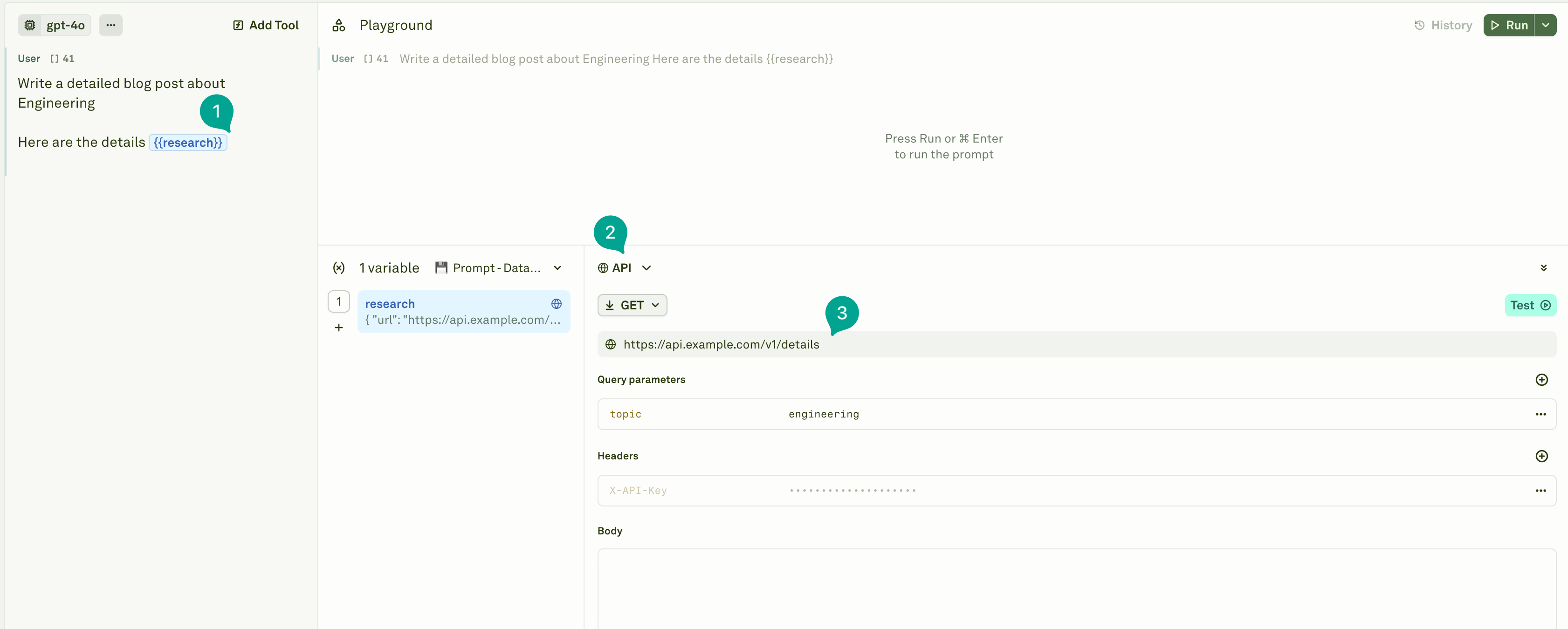
- URL — The endpoint to call (e.g.,
https://api.example.com/v1/details/{{userId}}) - Method — Choose from GET, POST, PUT, PATCH, or DELETE
- Headers — Set request headers (use
secretHeadersfor sensitive keys and tokens) - Body — Configure the request body for POST/PUT/PATCH requests
Use placeholders like
{{columnName}} within the API configuration (URL, headers, query parameters, or body). When you have a linked dataset, these placeholders are automatically resolved from the corresponding dataset columns at runtime.Configuration reference
API variables support comprehensive HTTP request configuration:Dataset integration
When API variables are used with a linked dataset, they function as dynamic columns:- Row-level execution — Each dataset row triggers its own unique API request. For example, if your dataset has a
userIdcolumn and your API URL ishttps://api.example.com/v1/details/{{userId}}, each row makes a separate call with that row’suserIdvalue. - Variable resolution — Placeholders in your API configuration are replaced with values from the corresponding dataset row.
- Result persistence — API responses are stored in the dataset cells and can be used for subsequent evaluations.
Execution behavior
- Independent API variables execute in parallel to reduce latency.
- Dependent API variables (those that rely on the result of another variable) execute sequentially.
- Failed requests are automatically retried up to 3 times with exponential backoff.
Error handling
Securing credentials with secretHeaders
When your API requires authentication, usesecretHeaders to keep sensitive tokens out of logs and shared configurations. Secret headers are obfuscated in the UI and are never exposed in prompt history or evaluation results.
Example API configuration with secret headers:
Best practices
- Secure your credentials — Always mark authorization tokens and API keys as
secretHeadersto prevent exposure in logs and shared prompt configurations. - Use descriptive variable names — Name variables like
{{user_purchase_history}}rather than{{var1}}for clarity. - Test endpoints independently — Verify that your API endpoints return the expected data before integrating them into your prompts.
- Handle response size — Keep API responses concise. Large payloads increase token usage and may exceed context limits.
- Use caching where possible — If your backend supports it, cache frequently requested data to reduce latency and costs.
Next steps
Use Other Prompts in Prompts
Chain prompts together for agent-like workflows.
Link Datasets
Connect datasets to test API variables across many inputs.